Posts tonen met het label Denali. Alle posts tonen

woensdag 11 april 2012

New built-in functions SQL Server 2012

Introduction

SQL Server 2012 introduces 14 new built-in functions. These functions ease the path of migration for database developers enabling them creating applications. However these functions will also be useful to experienced users of SQL Server.

These are:
  • Conversion functions
    • PARSE()
    • TRY_CONVERT()
    • TRY_PARSE ()
  • Date and time functions
    • DATEFROMPARTS()
    • DATETIME2FROMPARTS()
    • DATETIMEFROMPARTS()
    • DATETIMEOFFSETFROMPARTS()
    • EOMONTH()
    • SMALLDATETIMEFROMPARTS()
    • TIMEFROMPARTS()
  • Logical functions
    • CHOOSE()
    • IIF()
  • String functions
    • CONCAT()
    • FORMAT() 

Conversion functions

PARSE()
The PARSE function can be used to convert any string value to a Numeric or to a Date and Time format. It's also possible to convert to a specific Country datetime format.

       
 SELECT PARSE('31/03/2012' AS datetime USING 'nl-NL') 
 

Resulting in :


TRY_CONVERT ()
The TRY_CONVERT function converts the pased value to a specified data type. If the conversion is successful then it will return the value as a specified data type. Otherwise it will return a NULL value. 

       
SELECT TRY_CONVERT(int,'text');
SELECT TRY_CONVERT(Varchar(10),'text');
SELECT TRY_CONVERT(xml,'<test>Hello</test>');
SELECT TRY_CONVERT(xml,'<test>Hello<test>');
 
Resulting in :


TRY_PARSE()
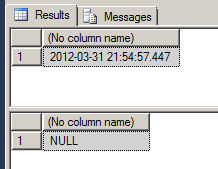
The TRY_PARSE function in SQL Server 2012 can be used to convert any string value to a Numeric or to a Date and Time. 
SELECT TRY_PARSE('2012-03-31 21:54:57.447' AS datetime) 
SELECT TRY_PARSE('asda' AS int) 
  
Resulting in :


Date and time functions

DATEFROMPARTS()
DATEFROMPARTS returns a date value with the date portion set to the specified year, month and day, and the time portion set to the default. If the arguments are not valid, then an error is raised. If required arguments are null, then null is returned.

       
SELECT DATEFROMPARTS (2012, 03, 31)
SELECT DATEFROMPARTS (2012, 03, 32)
       

Resulting in


and

Msg 289, Level 16, State 1, Line 2 Cannot construct data type date, some of the arguments have values which are not valid.

DATETIME2FROMPARTS()
Returns a datetime2 value for the specified date and time and with the specified precision

       
 SELECT DATETIME2FROMPARTS (2012, 03, 31, 16, 56, 00, 00, 00)
 

resulting in


DATETIMEFROMPARTS() This function determines a datevalue for the specified date and time.

       
 SELECT DATETIME2FROMPARTS (2012, 03, 31, 16, 56, 00, 00, 00)


resulting in :


DATETIMEOFFSETFROMPARTS()
Returns adatetimeoffset value for the specified date and time and with the specified offsets and precision.

       
SELECT DATETIMEOFFSETFROMPARTS (2012, 03, 31, 1, 12, 00, 00, 05, 30, 00)


resulting in


EOMONTH()
Returns the last day of the month that contains the specified date, with an optional offset.

       
 SELECT EOMONTH(getdate())


Resulting in


SMALLDATETIMEFROMPARTS()
Return a smalldatetime value for the specified date and time.


SELECT DATETIMEFROMPARTS (2012, 03, 31, 12, 13, 00, 00)


resulting in


TIMEFROMPARTS()
Returns a time value for the specified time and with the specified precision.


SELECT DATETIMEFROMPARTS (2012, 03, 31, 12, 13, 00, 00)  
 

resulting in


Logical functions

CHOOSE()
This function is very simple and it returns specified index from a list of values. If Index is numeric, it is converted to integer. On the other hand, if index is greater than the element in the list, it returns NULL.

       
SELECT CHOOSE(2, 'Dog', 'Cat', 'etc')


resulting in :


IIF()
IIF stands for Inline IF. IIF functions is very similar to CASE function, however you can only evaluate the expression for two values and no more.


SELECT IIF (2>1, 'TRUE', 'FALSE') 
SELECT IIF (2>1 OR NOT 1>2, 'TRUE', 'FALSE')  


resulting in


String functions

CONCAT()
The output is a string, as the result of the concatenation of two or more strings – if the input is another type than string a conversion will be done implicit.

       
SELECT CONCAT ('Today', ' it is ', getdate())


Resulting in:


FORMAT() 
The function FORMAT() accepts 3 parameters. The first parameter is the VALUE parameter where you pass the date value or numeric value. The second parameter is the.NET Framework format string. The format parameter is case sensitive. "D" doesn’t mean the same as "d".  The third parameter is the culture. This can be any culture supported by the .NET Framework.

       
SELECT FORMAT(GETDATE(), 'dd-MM-yy') 
 

resulting in

Conclusion

This blogpost is an overview of the new built-in functions of SQL SERVER 2012. My background is BI and datawarehousing and some functions are useful but it seems that the new built-in functions are more suitable for website and application support.

Greetz
Hennie

zaterdag 17 december 2011

Installation of SQL Server 2012 RC0

Introduction
In my former post about the installation of SQL Server 2012 CTP1 (Denali) i wrote down a walkthrough of the installation process of SQL Server 2012 CTP1 (Denali) . In this post i'll  blog about the same walkthrough but for RC0. I'll show you some differences, an error and how to solve this error.

Installation 
The installation starts with downloading the software from Microsoft. Copy this in a folder and execute SQLFull_x86_ENU_Install.exe.


After clicking on the .exe file the extraction starts


The content of the folder created:


Starting setup will show this window:


Click on installation.


The next window appears.


Press ok.


The next window.


The set up role window.


Clicking on the features. Select all.


And when i press the following error occurs. The installation of CTP1 wasn't that big and it seems that there is about 2 GB more software now than CTP1.


Enlarge the disk in VM and off we go..


Server configuration window:


Then an error happens.


On Aaron Bertrand's blog i understand that the distributed replay controller and client is the problem because it needs an Active Directory to verify the account. The account i've entered was a local account and I don't have AD installed. Below the error:

SQL Server Setup has encountered the following error: There was a failure to validate setting CTLRUSERS in validaton function ValidateUsers. Error code 0x85640004.

So i corrected the error by deselecting the replay controller and client


And now we seems to have more success


The installation process starts and succeeded


Conclusion
Nothing news about the installation, only there is an error when the reply software is selected and a lot more space is needed in contrast with CTP1.

Hennie

maandag 12 december 2011

Data Quality Services (DQS) in SQL Server 2012 (Denali) RC0

Introduction
One subject that I'm interested in is Data Quality Services together with the features like Master Data Services. In this blogpost i'll try to discover the basics of DQS. I investigated this feature in CTP1 already but it wasn't ready yet, unfortunately. In CTP 3 (and RC0) the DQS seems more and more a finished product and i think it's time to discover some of the features in this post.

DQS is all about the quality of data in databases. The reason why this is a interesting feature, is that it can be used in a ETL for a datawarehouse. If a source system has a lack of good dataquality, DQS can improve the quality of data during the load into the datawarehouse.

On MSDN i learn that DQS contains three technical components:
  • DQS Server.  Two databases :
    • DQS_MAIN. DQS_MAIN db contains all the DQS stored procedures, its engine and the published knowledge bases.
    • DQS_PROJECTS. The DQS_PROJECTS db contains all the data quality projects information.
  • DQS client. The DQS client is a standalone application that enables you to connect to a DQS server, providing you with a GUI to perform your data-cleansing tasks, as well as other administrative tasks related to DQS.
  • DQS Cleansing SSIS. The DQS Cleansing SSIS component enables you to integrate the DQS functionality into an SSIS data flow, for batch execution.
Installation

1. Install DQS Server
The first thing we have to execute is installing the Data Quality Server. The installer seems to be available in the start menu. A more obvious place would be the installer of SQL Server 2012 but perhaps this is a temporary solution.


A master key is needed for installing.


And a succes is reported:


Let's start the  SQL Server Management Studio and see whether the databases have been installed:

And.....


There seems to be another database present : DQS_STAGING_DATA.


2. Grant DQS roles

According to the video i need to grant a user administrator rights.


3. Turn on TCP/IP with configuration tool

No window available.

For installing this on a VM step 2 and 3 are not necessary.

Using DQS client
Now its time to use the DQS client. As said earlier, the DQS client is a stand alone application that can be used by power users to create a knowledge base and business rules to check the dataquality.
1. DQS Client
First thing we have to do is starting the DQS client.


Click on the Connect button and the following window is presented:


 There are three areas that are interesting:
  • Knowledge base Management. This is a important part of the DQS infrastructure. In this area we define the rules when the data is validated.
  • Data Quality projects. Create a new DQS project.
  • Administration. This covers Activity Monitoring and Configuration and is used for monitoring the usage of the knowledge base and connecting to 3rd party reference databases.

2. Open a Knowledge base
Let's take a look whether this a pre installed Knowledge base.


Here you can see an example of a table with domain values that should be converted to the right country.


Okay let's try to create our own new knowledge base and for this test i'll be creating a domain list of two dutch places : Amsterdam and Utrecht.


 And the following window appears:

Once the above step is completed we will proceed with the Domain Management Section. We need to create a new domain.


 Enter a Domainname. The window below is more extended than the CTP3.


Press Ok and the following window appears.


Create a new domain


Enter the values. There is a distinction between the valid value and the incorrect values that needs to be converted to correct value. For instance 'Ams' is converted to 'Amsterdam'.


You need to publish this to the DQS Server.


Succeeded as the window shows:


The new knowledge base is present in Recent Knowledge base window


When this is finished it's possible to create a DQS project. This seems an extra possibility for the poweruser to correct some values for themselves. As stated earlier, there is also a DQS SSIS component that can be used for quality checks in the ETL proces.

Give the project a proper name:


Define the DQS project in more detail like where is the source file and where do you want to store the results:


This is the source table:


This is the window when all information is entered.

Next.


After pressing the start button the following window appears.


Categorizing the values.


And here are the results:


And the table in SQL Server shows the following information:


Conclusion
DQS seems a great tool in the Self Service BI approach. The poweruser can maintain the knowledge base with little help of IT and the ETL developer can use this DQS functionality in the ETL process. This will aid the dataquality of the data. So the ETL developer will be more responsible for building the ETL package and the poweruser is content responsible.

In one of the following blogposts i'll investigate the SSIS DQS component.

Hennie
