maandag 12 december 2011

Data Quality Services (DQS) in SQL Server 2012 (Denali) RC0

Introduction
One subject that I'm interested in is Data Quality Services together with the features like Master Data Services. In this blogpost i'll try to discover the basics of DQS. I investigated this feature in CTP1 already but it wasn't ready yet, unfortunately. In CTP 3 (and RC0) the DQS seems more and more a finished product and i think it's time to discover some of the features in this post.

DQS is all about the quality of data in databases. The reason why this is a interesting feature, is that it can be used in a ETL for a datawarehouse. If a source system has a lack of good dataquality, DQS can improve the quality of data during the load into the datawarehouse.

On MSDN i learn that DQS contains three technical components:
  • DQS Server.  Two databases :
    • DQS_MAIN. DQS_MAIN db contains all the DQS stored procedures, its engine and the published knowledge bases.
    • DQS_PROJECTS. The DQS_PROJECTS db contains all the data quality projects information.
  • DQS client. The DQS client is a standalone application that enables you to connect to a DQS server, providing you with a GUI to perform your data-cleansing tasks, as well as other administrative tasks related to DQS.
  • DQS Cleansing SSIS. The DQS Cleansing SSIS component enables you to integrate the DQS functionality into an SSIS data flow, for batch execution.
Installation

1. Install DQS Server
The first thing we have to execute is installing the Data Quality Server. The installer seems to be available in the start menu. A more obvious place would be the installer of SQL Server 2012 but perhaps this is a temporary solution.


A master key is needed for installing.


And a succes is reported:


Let's start the  SQL Server Management Studio and see whether the databases have been installed:

And.....


There seems to be another database present : DQS_STAGING_DATA.


2. Grant DQS roles

According to the video i need to grant a user administrator rights.


3. Turn on TCP/IP with configuration tool

No window available.

For installing this on a VM step 2 and 3 are not necessary.

Using DQS client
Now its time to use the DQS client. As said earlier, the DQS client is a stand alone application that can be used by power users to create a knowledge base and business rules to check the dataquality.
1. DQS Client
First thing we have to do is starting the DQS client.


Click on the Connect button and the following window is presented:


 There are three areas that are interesting:
  • Knowledge base Management. This is a important part of the DQS infrastructure. In this area we define the rules when the data is validated.
  • Data Quality projects. Create a new DQS project.
  • Administration. This covers Activity Monitoring and Configuration and is used for monitoring the usage of the knowledge base and connecting to 3rd party reference databases.

2. Open a Knowledge base
Let's take a look whether this a pre installed Knowledge base.


Here you can see an example of a table with domain values that should be converted to the right country.


Okay let's try to create our own new knowledge base and for this test i'll be creating a domain list of two dutch places : Amsterdam and Utrecht.


 And the following window appears:

Once the above step is completed we will proceed with the Domain Management Section. We need to create a new domain.


 Enter a Domainname. The window below is more extended than the CTP3.


Press Ok and the following window appears.


Create a new domain


Enter the values. There is a distinction between the valid value and the incorrect values that needs to be converted to correct value. For instance 'Ams' is converted to 'Amsterdam'.


You need to publish this to the DQS Server.


Succeeded as the window shows:


The new knowledge base is present in Recent Knowledge base window


When this is finished it's possible to create a DQS project. This seems an extra possibility for the poweruser to correct some values for themselves. As stated earlier, there is also a DQS SSIS component that can be used for quality checks in the ETL proces.

Give the project a proper name:


Define the DQS project in more detail like where is the source file and where do you want to store the results:


This is the source table:


This is the window when all information is entered.

Next.


After pressing the start button the following window appears.


Categorizing the values.


And here are the results:


And the table in SQL Server shows the following information:


Conclusion
DQS seems a great tool in the Self Service BI approach. The poweruser can maintain the knowledge base with little help of IT and the ETL developer can use this DQS functionality in the ETL process. This will aid the dataquality of the data. So the ETL developer will be more responsible for building the ETL package and the poweruser is content responsible.

In one of the following blogposts i'll investigate the SSIS DQS component.

Hennie


zondag 27 november 2011

Handling NULL in dimensions and measures

A small post about 'Unknown' and 'Not Available' values in datawarehouse solutions. I've a requirement of my customer about this issue. The customer wants to see whether a value of a field in the sourcetable is empty (= NULL) or whether the value is not present in the dimension. There is a distinction between the two types of mismatching. The same problem is there with measures. They also want to see whether a measure value is NULL or whether it has a valid value. This way it's possible to monitor the dataquality of the source in a more sophisticated manner.

Normally you create one 'empty' row in your dimension called 'Unknown' (for handling NULLs and false dimension key lookups) and this a good solution under normal circumstances.But as said in my introduction, a more refined solution is needed. In my opinion the following distinction can be made:
  • Dimension.
    • -2 , "Not available" like in NULL. There is no value present in the source. In case of date dimension use a value like 1898, 1899 or 2098,2099 as a default value for unknown and/or not avaliable dates. In some sourcesystems i've seen that a '' (two single quotes) is implemented. You could include this check in the same logic for the "Not available" code too.
    • -1 , "Unknown" when the application key is not present in the dimension application lookup field. In this case there is a value present but it is not (yet) present in the dimension.
  • Measure.
    • When not filled in, use 0 because this won't bother aggregations like summing.
    • Use an extra indicatorfield <field>_AvailableYN to indicate whether the measure is available or not (NULL). Create a DD dimension and drop this field in here. 
Below a diagram is shown about a dimension lookup scenario. One NOT AVAILABLE and one UNKNOWN scenario.


When the column in the sourcetable is NULL it will insert a -2 into the fact table. When a value is present in the column in the source but the dimension lookup failed an unknown value (-1) is inserted in the fact table.


Powerusers should be aware of these choices when they build reports.If they are used to 'UNKNOWN' values, now they have include some logic for the NOT AVAILABLE values in the reports too.

An interesting article about dummy values can be downloaded here

Greetz,
Hennie

vrijdag 11 november 2011

SSRS : Adding process date of a cube to your report

Introduction 
In this blogpost i'll explain how to add a date to your report when a cube is processed. I've a requirement of my customer that they want to show a date on the report when the cube is processed. In this blogpost i'll use a query that can be used for determining the date when the cube is processed.

The problem
The problem is that using the query :

SELECT LAST_DATA_UPDATE FROM $System.MDSCHEMA_CUBES WHERE CUBE_NAME = '<cube>'

can't be done in a standard manner, like using MDX queries in the MDX query window in reporting services

Below i'll show the failed attemps and a successful attempt.

Attempt 1 : Query designer
I'll show what happens when i try to add the query to the MDX query designer. First step is to open the query designer in the report and press the designbutton:

The next step is going to Query mode and add the query to window. When Ok is pressed the following error occurs:


So this a blind alley!

Attempt 2 : Expression
The next attempt i tried was using the expression button and that seems to work


And resulting in a value:


But when i try to open de expression designer again:


An error occurs:


And i have to select a cube:


 And again an error occurs


Again a blind alley....


The solution 
An solution i've found is descibed below. Go to the query designer and press the DMX editor:


Go to the designer button and press on it:


Copy the query in it and press OK.


And we have a working last cube processed date:


Conclusion
I don't understand how and why but it seems to work and i've implemented this in my reports. But i've to say it's a bit strange.

Greetz,

Hennie

zaterdag 5 november 2011

SSAS : Selecting facts with reference dimension

Introduction
In this blogpost i'll explain a problem i have at a customer. This problem is about relations between stars, facts and dimensions. To be more specific: selecting values of a fact with a (non conformed) dimension that is not directly linked with the fact but to another fact. In this blogpost i'll try to explain some backgrounds, the problem, a solution and finally some conclusions about what i have encountered during this investigation.

This is the second blogpost about this issue in a serie of 3. In this blogpost i'll describe a solution that is a better solution than i've described in a former post.

The problem
In this section i'll decribe the problem  in more detail. There is a wish from my customer about selecting values of a fact with a dimension that belongs to another fact. This is not a conformed dimension and i think this is the cause of the problem. As i'm reading the book "The Microsoft data warehouse toolkit, second edition" about conformed dimensions it says : "In order to combine information from two facts it is requirement to have a common dimension with the same keys. This is called drilled accross".

Suppose i've the following situation (SQL Server tables):


The Type dimension is not a conformed dimension because it is only shared by one fact and not more facts. A key of FactA is also present in FactB and therefore a dashed line is drawn. This will be the base for drawing connectin the Type dimension with FactB.

The diagram above typically descibes a situation as a 1:n relation between facts, for instance order (FactA) and orderlines (FactB). For this purpose a degenerated dimension table is created, which is a 1:1 dimension of FactA (order) and a 1:n with FactB (orderlines) A date dimension is also included.

Now, the problem is about selecting FactB records with the Type dimension.This can't be done by standard operating of the SSAS engine, unfortunately.

In SQL query:


The solution
On the MSDN forum i was pointed to usage of the reference dimension. The referenced dimension is one of the six different types of relationships as i can see on the MSDN page regarding Referenced dimension. The first lines about a referenced dimension: "A reference dimension relationship represents the relationship between dimension tables and a fact table in a snowflake schema design. When dimension tables are connected in a snowflake schema, you can define a single dimension using columns from multiple tables, or you can define separate dimensions based on the separate dimension tables and then define a link between them using the reference dimension relationship setting."


So i decided to implement a reference dimension in a different way than i have descibed in my former post. Now i've removed the materialized DD dimension table in SQL Server and use a direct relation from FactA to FactB.


The cube structure is shown in the screenshot below. As you can see now there is a direct relaltion between FactA and FactB. Field FK_FactA_DDkey is present in both fact tables FactA and FactB and is set as a foreign key in FactB.

Below a screenshot from the dimension usage tab of the cube. Here you can see the usage of the reference dimension relationship. The DimType is connected with the FactB because of the reference dimension FactA DD.


Below the "Define relationship" window that pops up when a you click on the box of the intersection of measure group and the Type dimension on the cubestructure tab.


In order to get the reference dimension relationship working, I had to add the FK Type Key to Fact A DD dimensio too.


And the results are:


Correct again!

Conclusion
In contrast with the first solution i've described in the blogpost titled: "SSAS: Selecting facts with different dimensionality" this is a neat solution without a extra physical SQL table, the FactDD dimension. Because of this implemented solution, dimensions from FactA can benefit of the reference relationship between FactA and FactB and therefore a powerful solution it is.

Advantages :
  • No materialized table used and therefore:
    • Less maintenance.
    • Less storage.
    • Less joining.
  • Easy to build.

    Disadvantages
    • Perhaps that the cube structure is a bit different than the physical tables and less debug opportunities(?).

    Greetz,
    Hennie

    zondag 30 oktober 2011

    SSAS: Selecting facts with different dimensionality

    Introduction
    Back from holiday and all together with going live at a customer it has been quite busy the last month. But for now there is some more time to blog about certain issues. In this blogpost i'll explain a problem i have at a customer. This problem is about relations between stars, facts and dimensions. To be more specific: selecting values of a fact with a (non conformed) dimension that belongs to a another fact. In this blogpost i'll try to explain some backgrounds, the problem, a solution and finally some conclusions about what i have encountered during this investigation.

    This is the first blogpost about this issue in a serie of 3. In this blogpost i'll descibe a solution that is a nice solution but in the next blogpost i am describing an even better solution.

    The problem
    In this section i'll decribe the problem  in more detail. There is a wish from my customer about selecting values of a fact with a dimension that belongs to another fact. This is not a conformed dimension (related) and that is the cause of the problem as i' ve read in the book "The Microsoft data warehouse toolkit, second edition" about conformed dimensions it says : "In order to combine information from two facts it is requirement to have a common dimension with the same keys. This is called drilled accross". In other words there are dimensions that are unrelated to a measuregroup

    Suppose i've the following situation (SQL Server tables):


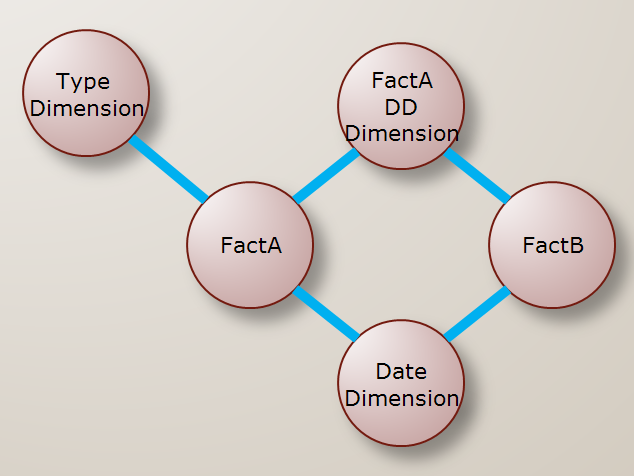
    The Type dimension is not a conformed dimension because it is only shared by one fact and not more facts (there are more rules, offcourse). The FactA DD dimension is a shared dimension and therefore a conformed dimension.

    The diagram above typically descibes a situation between a 1 : N relation between facts, for instance order (FactA) and orderlines (FactB). For this purpose a degenerated dimension table is created, which is a 1:1 dimension of FactA (order) and a 1 : N with FactB (orderlines). FactB also contains the same technical key as FactA for this degenerated dimension (FactA DD). A date dimension is also included.

    Now the problem is about selecting FactB records with the Type dimension.This can't be done by standard operating of the SSAS engine, unfortunately.

    Setting up the lab situation
    In order to study this situation i've created a small labsituation in SQL Server.  Below you can see the script i've used.

    --FactA (eg. Order)
    IF EXISTS (SELECT * FROM sys.objects WHERE object_id = OBJECT_ID(N'[dbo].[FactA]') AND type in (N'U'))
    DROP TABLE [dbo].[FactA]
    GO
    CREATE TABLE [dbo].[FactA](
    [FactAID] [int] IDENTITY(1,1) NOT NULL,
    [FK_Date_Key] [int] NOT NULL,
    [FK_Type_Key] [int] NOT NULL,
    [FK_FactA_DDKey] [int] NOT NULL,
    [FactACount] [int] NOT NULL
    ) ON [PRIMARY]
    GO
    --FactB
    IF EXISTS (SELECT * FROM sys.objects WHERE object_id = OBJECT_ID(N'[dbo].[FactB]') AND type in (N'U'))
    DROP TABLE [dbo].[FactB]
    GO
    CREATE TABLE [dbo].[FactB](
    [FactBID] [int] IDENTITY(1,1) NOT NULL,
    [FK_Date_Key] [int] NOT NULL,
    [FK_FactA_DDKey] [int] NOT NULL,
    [FactBCount] [int] NOT NULL
    ) ON [PRIMARY]
    GO
    --DimDate
    IF EXISTS (SELECT * FROM sys.objects WHERE object_id = OBJECT_ID(N'[dbo].[DimDate]') AND type in (N'U'))
    DROP TABLE [dbo].[DimDate]
    GO
    CREATE TABLE [dbo].[DimDate](
    [Date_dim_key] [int] NULL,
    [Date_Year] [int] NULL
    ) ON [PRIMARY]
    GO
    --DimType
    IF EXISTS (SELECT * FROM sys.objects WHERE object_id = OBJECT_ID(N'[dbo].[DimType]') AND type in (N'U'))
    DROP TABLE [dbo].[DimType]
    GO
    CREATE TABLE [dbo].[DimType](
    [Type_dim_key] [int] NULL,
    [Type_Code] [int] NULL,
    [Type_Description] [varchar] (25) NULL
    ) ON [PRIMARY]
    GO
    --Date
    INSERT INTO dbo.DimDate
    VALUES (1,2000),
    (2, 2001),
    (3, 2002),
    (4, 2003),
    (5, 2004),
    (6, 2005),
    (7, 2006),
    (8, 2007),
    (9, 2008),
    (10, 2009),
    (11, 2010),
    (12, 2011),
    (13, 2012),
    (14, 2013),
    (15, 2014),
    (16, 2015)
    --Order
    INSERT INTO [dbo].[FactA]([FK_Date_Key],[FK_Type_Key], [FK_FactA_DDKey], [FactACount])
    VALUES (12, 1, 1, 1), (12, 1, 2, 1), (12, 2, 3, 1),(12, 3, 4, 1), (12, 2, 5, 1)
    GO
    --Orderlines
    INSERT INTO [dbo].[FactB]([FK_Date_Key], [FK_FactA_DDKey], [FactBCount])
    VALUES (12, 1, 1), (12, 1, 1), (12, 2,  1),(12, 3,  1), (12, 3,  1)
    GO
    --Type
    INSERT INTO [dbo].[DimType]([Type_Dim_Key], [Type_code], [Type_Description])
    VALUES (1, 1, 'Type 1'), (2, 2, 'Type 2'), (3, 3, 'Type 3')
    GO
    SELECT
    Type_Code,
    Type_Description,
    FA.[FK_FactA_DDKey],
    FactACount,
    FactBCount
    FROM DimType T
    LEFT OUTER JOIN FactA FA ON T.Type_dim_key = FA.FK_Type_Key
    LEFT OUTER JOIN FactB FB ON  FA.FK_FactA_DDKey = FB.FK_FactA_DDKey

    I know that it's not a best practice querying factables directly but this is a labsituation and the degenerated dimension will be created in the cube. The last query of the script results in :


    So, now i can query these tables and i can filter the records of FactB with some of the Type dimension values so this would also be possible in the cube right?  The next step is building the cube :

    When we browse the cube the following information is given:


    The results doesn't seem right because i would have expected a value for Fact B Count, Type 1 = 3, for Type 2 = 2 and for Type 3 = 0.

    Solution
    In order to use a filter on both facts we need to change the structure of the table (for the first solution). Let me draw the first solution. In this solution the Type dimension is connected with the DD dimension.


    In the cube designer the solution looks like this:


    On the MSDN forum i was pointed to usage of the reference dimension. The referenced dimension is one of the six different types of relationships as i can see on the MSDN page regarding Referenced dimension. The first lines about a referenced dimension: "A reference dimension relationship represents the relationship between dimension tables and a fact table in a snowflake schema design. When dimension tables are connected in a snowflake schema, you can define a single dimension using columns from multiple tables, or you can define separate dimensions based on the separate dimension tables and then define a link between them using the reference dimension relationship setting."


    In case of a referenced dimension there are a couple of settings that needs to be set:
    • Reference dimension information.
    • Intermediate dimension.
    In the diagram below you can see (one the two) reference relationship window:


     Below, specifically the design of the DD dimension is shown:


    And below you can see the results of this solution:


    And that is correct!

    Conclusion
    Somehow it sounds a bit strange that a measure of fact (B) can't be selected by a dimension (type) of another fact (A) when the SSAS engine is operating in it's default behaviour. In SQL can quickly create a query that joins the tables and that gives the desired result. In order to make this happen in the SSAS engine you need to do more than using the default settings of the cube structure. In my next blogpost i'll explain a better solution for this problem.

    Greetz,

    Hennie