dinsdag 17 januari 2012

Could not update the metadata that indicates database AdventureWorks2008R2 is enabled for Change Data Capture

Introduction
Currently investigating the CDC in SQL Server 2012 RC0 Denali and i ran into an error, which i want to discuss with you. The error happens when i want to turn on CDC. In this blogpost i'll present the error, a cause of the problem, a solution and conclusion.

The error
The error occurs when i want to execute the following statement:

EXEC sys.sp_cdc_enable_db

It returns this error:

Could not update the metadata that indicates database AdventureWorks2008R2 is enabled for Change Data Capture. The failure occurred when executing the command 'SetCDCTracked(Value = 1)'. The error returned was 15517: 'Cannot execute as the database principal because the principal "dbo" does not exist, this type of principal cannot be impersonated, or you do not have permission.'. Use the action and error to determine the cause of the failure and resubmit the request.

Cause of the problem
I've downloaded the RC0 databases from the Microsoft site and restored them on my SQL Server 2012 RC0 Denali VM. Then, i executed this stored procedure: sys.sp_cdc_enable_db. In this article, http://support.microsoft.com/kb/913423, more information is available. This error message is shown when you are trying to enable CDC on a SQL Server 2008 R2 database for which the owner is not "sa". According to the article, this problem occurs when all the following conditions are true:
• You back up a database from an instance of SQL Server 2005 (e.g. SQLSErver 2008 R2 database). Then, you restore the database to an instance of SQL Server 2005 that is installed on another computer.
• The statement or the module is executed as the dbo (database owner) user.
• The owner of the database is a domain user or a SQL Server authorization login.


Solution
Execute the following statements:

USE AdventureWorks2008R2
GO

EXEC sp_changedbowner 'sa'

and the database owner changes to sa:


And the stored procedure sys.sp_cdc_enable_db executes successfully.

Conclusion
In this blogpost a problem is identified with databaseownership of the database and a solution is presented.

Greetz,
Hennie

zondag 15 januari 2012

BI and Enterprise Architecture (EA)

Introduction
In some linkedin groups I was reading about that BI should be a Enterprise Architecture (EA) implementation for organizations and i was curious what is meant by that. What is an Enterprise Architecture implementation and how can BI be a part of it? So in order to understand more about the implementation of a Enterprise Architecture i decided to study TOGAF. Currently studying for the Foundation certification (level 1) and it's a huge book (sigh!).  It takes a lot of time to understand the methodology, the phases, terminology, keywords, etc. But interesting though!

TOGAF is well-known Enterprise Architecture Framework and can be seen as a tool for assisting in acceptance, production, use and maintanance of enterprise architecture. In this blogpost i'm trying to translate the TOGAF framework to a plan to implement BI as an Enterprise Architecture.

Enterprise Architecture according to TOGAF
So what is an Enterprise Architecture? What is an Enterprise? What is a Architecture?

Definition Enterprise: "Collections of organizations that has a common set of goals".  Organizations are getting smaller and are functioning in neworkorganizations. Think about an airliner that farms out the luggage handling or ticket selling. Therefore in case of network organizations you should look beyond the boundaries of an organization.

Definition Architecture (ISO) : "The fundamental organization of a system, embodied in its components, their relationships to each other and the environment and the principles governing its design and evolution".

Defintion Enterprise Architecture (SearchIO): "An enterprise architecture (EA) is a conceptual blueprint that defines the structure and operation of an organization. The intent of an enterprise architecture is to determine how an organization can most effectively achieve its current and future objectives."

TOGAF makes also a distinction between an architecture and a solution. The distinction is that a architecture is like a blueprint of the organization and a solution is like an instance of the architecture. You could compare these between a logical model and physical model (in my opinion).

There are four points of views regarding TOGAF :
  • Business perspective. The business perspective defines the processes and standards by which the business operates on a day-to-day basis.
  • Application perspective. The application perspective defines the interactions among the processes and standards used by the organization.
  • Information perspective.The information perspective defines and classifies the raw data (such as document files, databases, images, presentations, and spreadsheets) that the organization requires in order to efficiently operate.
  • Technology perspective. The technology perspective defines the hardware, operating systems, programming, and networking solutions used by the organization.
In an Enterprise Architecture framework all of these viewpoints are worked out: a baseline is created, a target architecture, gap analysis, a roadmap, review and an implementation is executed.

Translate TOGAF to BI (or BI to TOGAF)
Generally spoken, there is low interest in BI projects regarding working from within an Enterprise Architecture viewpoint. In  most of my projects done the solution is targeted at a certain area of interest: for instance finance. Another issue is that BI projects are under time pressure meaning that BI projects are driven by need for a solution for more or less a specific problem and clients wants it fast.


I don't think about BI as an holistic Enterprise Architecture approach but more as part of the Enterprise Architecture. The ideal situation would be that BI is part of a Enterprise Architecture Program where BI should be adopted at all kind of different levels of the enterprise internally and externally  (think about the network organisations).

Where is BI positioned in TOGAF? You need to understand the business perspective (baseline and target) and you need to understand how BI could aid the target business perspective in such a way that it can benefit from BI. And BI is much about data and there the data perspective is also specific area of interest in case of BI.

Conclusion
The BI Enterprise Architecture can be positioned on the business perspective and on the data pespective of the TOGAF Framework. The BI Enterprise Architect must understand both perspectives and should be aware and understand the overall Enterprise Architecture picture (baseline and target in order to make a flexible, easy to replace building and easy to maintain (BI?) architecture and solution building blocks (ABB and SBB).

Make sure business intelligence is a core part of your Enterprise Architecture Planning!

Greetz,
Hennie

zondag 8 januari 2012

SQL Server Data Quality Services Cliensing component


Introduction

In a former post I already introduced the DQS Quality Client and the installation of DQS of  SQL Server 2012  RC0 Denali. The main advantage of DQS lies in the usage of the SSIS DQS component  "DQS Cleansing" in SQL Server Integration Services. You can implement the DQS component in an ETL process in order to cleanse the information from source systems.

James Beresford investigated already the performance of the DQS component and it seems that usage of the component cost quite some performance and therefore you shouldn't use it on a large tables (yet?).

You can find more info, here:
This blogpost is based on SQL Server 2012 RC0 Denali.

DQS Cleansing component
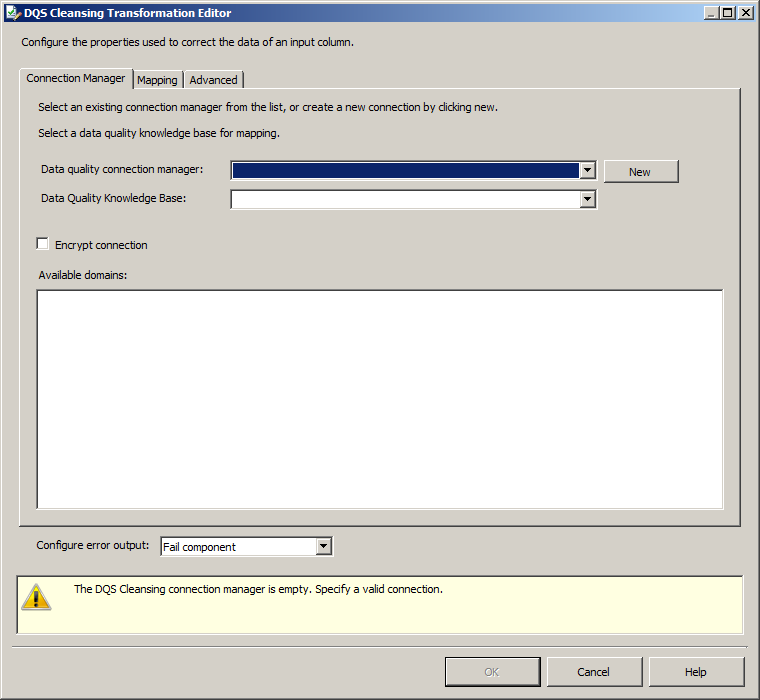
In this blogpost i'll discover the DQS SSIS component. I'll show you the steps that i took in order to build a SSIS package with the DQS Cleansing component. The first thing i did was creating a package and a drop the DQS Cleansing component on the pane.


An input stream and an output stream is needed.


With the source- and the destination assistent you can create a source and destination adapter. When i double click on the server for connecting to the Knowledge base an error occurs.


I tried some some potential solutions like reopening the component and reopening the package. This didn't help. So i decided to reboot SQL Server instance and the error disappeared.


Connection succeeded:


Something is wrong here. After some adjustments and clicking the test connection button i ran in an error, again. The error below is shown when the test connection button in the connection manager is pressed.


Again, I restarted the SQL Server service and now it seems to be working again. Next,  i'm setting up the mapping.


Below the tab with some checkboxes.


In the destination adaptersome fields are not listed in the SSIS pipeline.


I remembered that on the advanced tab there were some checkboxes: Confidence and Reason. I enabled this checkboxes.


Now these fields are selectable in the Destination adapater.


Below you can see the new progress icons. Nice!


Finished and succeeded


And below you can see the result of this little exercise.


Conclusion  
This seems an useful component of SSIS but when i read the blogs of James Beresford i'm getting less enthusiastic. The main reason is the perfomance of the DQS component. He calculates that for instance 1 million rows will take about 4 hours of loading and that is not acceptable in my opinion. In an other blogpost he states that performance can be optimized by parallelism but it's still not very usable for large tables (dimensions). 


In my current project i'm working with a 2 million customer table (dimension) and this seems too large for this DQS SSIS component. So James advices to use the DQS for midsized tables. In my assumption this is like around 100 K - 500K rows.

There is some work to do for the development team:

  • The error connecting to the Server.
  • Hopefully they can improve the performance to higher level 

Greetz,
Hennie

woensdag 21 december 2011

SSAS : Change management in ten steps

Introduction
In my current project i'm developing a cube. In this Self Service BI project i'm cooperating with Self Service BI teams, IT and end users, in order to build successful dashboards, trends and statusreports. Because of the different progress of the teams,  the client wants a partial deployment of the cube. Therefore, I had a challenge because it isn't possible to deploy a cube partially easily, unfortunately. So far i haven't found anything that could do this. No 3rd party software seems to be available. So i had to come up with a pragmatic solution.

Situation
Suppose you have the following situation. There are a couple of stars in a development, acceptance and production environment (this is my current situation). The stars in the diagram below represents starschemas. The blue stars were equal between the different environments at a certain moment (t0). So the first blue star in the development area is equal to first blue star in the acceptance area and is equal to the first star in the production environment. So at one point in time the blue stars were equal. But, as time went on, some dimensions were added to the stars in the development area, new stars were created and some measures changed (t1). These are represented by the red lines. The red lines indicates a change or is new in relation to the initial situation. The diagram below is snapshot at some point in time. Some dimensions were transferred to the acceptance area, a new star has been developed in the dvelopment area and production is still equal to initial situation.


So how are you going to manage this? Well with caution, i can tell you. As said earlier the problem is the cube. The cube file is an XML file and an idea could be transferring pieces of the XML file (snippets) but in my opinion a 'big' risk and you need a thorough understanding of the structure of the XML file. I decided to solve this with manual actions and some features of BIDS helper. Below i'm going to show you how i did this.

I'm not using all the fancy stuff of a SSAS cube. I've created stars with facts and dimensions, measures (with measure groups, some calculations in the cube and a some security roles. In the solution below i'll focus on the facts, dimensions and the measures.

Solution
Below are the steps written that was needed for a successful implementation of a piece of a cube in new environment.

1. Compare the database with database diff tool (SQL compare, Apex).
In case you didn't keep track of changes in a source control software you can use a diff tool to compare databases and move the different parts to the new environment. Copy the change script into a separate folder and create a deployment script. This will be used when the code of the acceptance environment is transferred to production.

2. Load the tables in the acceptance environment.

3. Start SSAS and refresh the datasource view.

4. Copy the dimensionfiles form the SSAS project 
After refreshing the datasourceview copy the dimensionfiles in the development environment and add (add exisiting item)  them to the SSAS project in the acceptance environment. The dimensions are just files in he SSAS project.


The case that dimensions are stored in separate files is a big advantage because manual creating dmension in the SSAS project will very likely lead to errors. One error and a report will not work.

5. Manually change the relations in the dimension usage tab.
Make the appropriate changes. Experience learn that this an erroneous process because when a lot of dimensions and measuregroups are present it's difficult to overview the whole project. In the beginning you have to work iterative with the BIDShelper 'Printer friendly Dimension Usage' export. This explained in the following paragraph.

6. Use BIDSHelper and especially the option 'Printer Friendly Dimension Usage'.
This option prints a definition of the cube. You can find this in the context menu when you click on a cube.


It will show the following window.


And very useful is the export to excel. This enhances the comparison between two SSAS projects in the Development and Acceptanceenvironment.


7. There is also a 'Smart Diff'  option available. This option compares two .cube files and analyzes the differences. You need to install Visual Studio Team System 2008 Team explorer (384 MB!) to get this working (in my case).


Below a screendump of a comparison between two cubes.


Look for changes in the measures:


8. Compare the dimensions in SSAS too
We ran in one problem that a report didn't work in the acceptance environment but did work in the development environment. Checked the cube again, try to debug the report and we were getting strange errors. Then i remembered that  i changed the hierarchies in the existing dimensions (and we didn't moved them to the acceptance environment). So compare all dimensions of a star too with Smartdiff.

9. Process!
If the comparison of the cubes between development and production is successful the cube is ready for processing. Hopefully the process will succeed now.

10. Move from acceptance to production
When all scripts are gathered and are stored in a proper place, collect them and execute it on a production environment. Load the tables again and deploy the acceptance project on production and process the cube. Don't forget to set the right datasource connectionstrings. If you have a large cube deploy the cube to a test cube (in production) first. This way you can test whether the process of the cube is successful and this will not interfere with the productioncube. An option could be renaming the cube in order to minimize the downtime (didn't test this).

Conclusion
In this blogpost i've explained a partial deployment of SSAS cube from the development environment into the acceptance environment and production environment. This a manual process and there is no standard functionality available to deploy a cube partially. Most of the steps can be done by copying databasecode, dimension files and refreshing the datasourceview. The main problem is updating the cube, itself. That is a labour-intensive process.

I do realize that the method is not 100% accurate but for my current project it is sufficient for now.

If you have remarks about this approach let me know.

Greetz,

Hennie

zaterdag 17 december 2011

Installation of SQL Server 2012 RC0

Introduction
In my former post about the installation of SQL Server 2012 CTP1 (Denali) i wrote down a walkthrough of the installation process of SQL Server 2012 CTP1 (Denali) . In this post i'll  blog about the same walkthrough but for RC0. I'll show you some differences, an error and how to solve this error.

Installation 
The installation starts with downloading the software from Microsoft. Copy this in a folder and execute SQLFull_x86_ENU_Install.exe.


After clicking on the .exe file the extraction starts


The content of the folder created:


Starting setup will show this window:


Click on installation.


The next window appears.


Press ok.


The next window.


The set up role window.


Clicking on the features. Select all.


And when i press the following error occurs. The installation of CTP1 wasn't that big and it seems that there is about 2 GB more software now than CTP1.


Enlarge the disk in VM and off we go..


Server configuration window:


Then an error happens.


On Aaron Bertrand's blog i understand that the distributed replay controller and client is the problem because it needs an Active Directory to verify the account. The account i've entered was a local account and I don't have AD installed. Below the error:

SQL Server Setup has encountered the following error: There was a failure to validate setting CTLRUSERS in validaton function ValidateUsers. Error code 0x85640004.

So i corrected the error by deselecting the replay controller and client


And now we seems to have more success


The installation process starts and succeeded


Conclusion
Nothing news about the installation, only there is an error when the reply software is selected and a lot more space is needed in contrast with CTP1.

Hennie