zaterdag 19 februari 2022

Snowflake : Is time travel a replacement for backups ?

Introduction

Snowflake offers a great feature, called time travel. I blogged about some events that happen at my current project with primary and foreign constraints that disappeared when we used time travel. Primary key and foreign key constraints are not enforced in Snowflake. Except one thing: you can't create a  foreign key if the referenced table doesn't exists. Okay, it's annoying when the PK en FK are gone, and if you have them stored separately you could reapply the constraints again, but it can a complex task in case of time traveling. The next thing I was wandering about is that could time travel be a replacement for backups as we are used to in the on - premise world? Let's do some experiments.

After reading a blog about timetravelling and backups I was curious about changing structure and time travel. 

Experiment : add and remove a column

I've created some scripts to test the timetravelling. First I created a database and a table with data.


ALTER WAREHOUSE IF EXISTS COMPUTE_WH RESUME IF SUSPENDED;
USE ROLE SYSADMIN;
USE WAREHOUSE Compute_WH;

-- Create the database
CREATE OR REPLACE DATABASE BackupTimeTravel;

-- Select the right database
USE DATABASE BackupTimeTravel;

-- Create the table
CREATE OR REPLACE TABLE Test (
  id integer,
  name varchar,
  street varchar,
  PRIMARY KEY (id));

--Insert some data into the table
INSERT INTO Test(id, name, street) VALUES(1, 'Hennie', 'Spicyvalley');

-- select some data from the table
select * from Test;

And this script results in the following:


Next step is to insert some extra data in the table.

INSERT INTO Test(id, name, street) VALUES(2, 'Peter', 'bakerstreet');

select * from Test at(offset => -60);


Results in (after 60 seconds waiting) : 


Now let's add a column to the table and insert data in the table:

ALTER TABLE Test  ADD COLUMN town varchar;

--Insert some data into the table
INSERT INTO Test(id, name, street, town) VALUES(1, 'Hennie', 'Spicyvalley', 'Amsterdam');

select * from Test


Results in  : 


Let's execute some timetravelling.

select * from Test at(offset => -160);


Results in :


So this seems all perfect. Now drop the column 'street' in the table.

ALTER TABLE Test  DROP COLUMN street

select * from Test at(offset => -260);


Results in :


The column 'street' is gone with time travelling through the table. 

Now, let's experiment with the database and see whether we can time travel and clone the database to get the columns back. 


create database BackupTimeTravel_clone clone BackupTimeTravel
  at(offset => -500);
  
-- Select the right database
USE DATABASE BackupTimeTravel_clone;

select * from Test


Results in :


And the column is back in the table in the cloned database of the original database. 

Now check if we have the PK available.


SELECT GET_DDL('Table', 'Test');

Resuting in :

create or replace TABLE TEST (
	ID NUMBER(38,0) NOT NULL,
	NAME VARCHAR(16777216),
	STREET VARCHAR(16777216),
	primary key (ID)
);

And now we still have the PK.

Experiment : Recreate a table

Another item that is mentioned in the blog is that when a object is recreated the time travel is gone. Let's do some experiments with this mind. First setup the database and the table.

ALTER WAREHOUSE IF EXISTS COMPUTE_WH RESUME IF SUSPENDED;
USE ROLE SYSADMIN;
USE WAREHOUSE Compute_WH;

-- Create the database
CREATE OR REPLACE DATABASE BackupTimeTravel2;

-- Select the right database
USE DATABASE BackupTimeTravel2;

-- Create the table
CREATE OR REPLACE TABLE Test (
  id integer,
  name varchar,
  street varchar,
  PRIMARY KEY (id));

--Insert some data into the table
INSERT INTO Test(id, name, street) VALUES(1, 'Hennie', 'Spicyvalley');

-- select some data from the table
select * from Test;

INSERT INTO Test(id, name, street) VALUES(2, 'Peter', 'bakerstreet');

select * from Test


Results in :


Now wait for 60 seconds or so (or use the query_id).


select * from Test at(offset => -60);

DROP TABLE Test

-- Create the table
CREATE OR REPLACE TABLE Test (
  id integer,
  name varchar,
  street varchar,
  town varchar,
  PRIMARY KEY (id));
  
--Insert some data into the table
INSERT INTO Test(id, name, street, town) VALUES(1, 'Hennie', 'Spicyvalley', 'Amsterdam');

select * from Test 
Results in :


Timetravelling before the recreation of the table is not possible. The statement (offset => -60) doesn't work, only when the age of recreated table becomes older than 60 seconds.

select * from Test at(offset => -60);

Resulting in : 


The next thing I would like to try is whether I could create a clone of the database at the moment of the initial creation of the table (the first one).

create OR REPLACE database BackupTimeTravel2_clone clone BackupTimeTravel2
  at(offset => -220);
  
-- Select the right database
USE DATABASE BackupTimeTravel2_clone;

select * from Test

Results in 


I have the old table back! So it seems that it's not possible to timetravel back on table level when the table is recreated, but it is still possible when you time travel back on database level.

We only lost the PK (I blogged  earlier about this) .

SELECT GET_DDL('Table', 'Test')

Results in :

create or replace TABLE TEST (
	ID NUMBER(38,0) NOT NULL,
	NAME VARCHAR(16777216),
	STREET VARCHAR(16777216)
);


Final thoughts

At first, I thought that with the help of time travelling through the table, the column could not be retrieved, but with time travelling on database level I was able get the table back in original state. So the blog is true in case of timetravelling on table level but not on database level.

When a table is recreated it's not possible to timetravel back to previous version of the table on table level but it's possible to get the table back when timetravelling is used on database level (but no PK/FK).

There is one thing I would like to test is the following : "If the precision of a column is decreased below the maximum precision of any column data retained in Time Travel, you will not be able to restore the table without first increasing the precision.". This is for a future blogpost. 

The complete script 


//=============================================================================
// Experiment 6 : change the table and see if we can time travel
//=============================================================================
ALTER WAREHOUSE IF EXISTS COMPUTE_WH RESUME IF SUSPENDED;
USE ROLE SYSADMIN;
USE WAREHOUSE Compute_WH;

-- Create the database
CREATE OR REPLACE DATABASE BackupTimeTravel;

-- Select the right database
USE DATABASE BackupTimeTravel;

-- Create the table
CREATE OR REPLACE TABLE Test (
  id integer,
  name varchar,
  street varchar,
  PRIMARY KEY (id));

--Insert some data into the table
INSERT INTO Test(id, name, street) VALUES(1, 'Hennie', 'Spicyvalley');

-- select some data from the table
select * from Test;

INSERT INTO Test(id, name, street) VALUES(2, 'Peter', 'bakerstreet');

select * from Test at(offset => -60);

ALTER TABLE Test  ADD COLUMN town varchar;

--Insert some data into the table
INSERT INTO Test(id, name, street, town) VALUES(1, 'Hennie', 'Spicyvalley', 'Amsterdam');

select * from Test 

select * from Test at(offset => -160);


ALTER TABLE Test  DROP COLUMN street


select * from Test at(offset => -500);

create database BackupTimeTravel_clone clone BackupTimeTravel
  at(offset => -500);
  
-- Select the right database
USE DATABASE BackupTimeTravel_clone;

select * from Test

ALTER WAREHOUSE IF EXISTS COMPUTE_WH SUSPEND;
//=============================================================================
// Experiment 7 : recreate the table and see if we can time travel
//=============================================================================
ALTER WAREHOUSE IF EXISTS COMPUTE_WH RESUME IF SUSPENDED;
USE ROLE SYSADMIN;
USE WAREHOUSE Compute_WH;

-- Create the database
CREATE OR REPLACE DATABASE BackupTimeTravel2;

-- Select the right database
USE DATABASE BackupTimeTravel2;

-- Create the table
CREATE OR REPLACE TABLE Test (
  id integer,
  name varchar,
  street varchar,
  PRIMARY KEY (id));

--Insert some data into the table
INSERT INTO Test(id, name, street) VALUES(1, 'Hennie', 'Spicyvalley');

-- select some data from the table
select * from Test;

INSERT INTO Test(id, name, street) VALUES(2, 'Peter', 'bakerstreet');

select * from Test

select * from Test at(offset => -60);

DROP TABLE Test

-- Create the table
CREATE OR REPLACE TABLE Test (
  id integer,
  name varchar,
  street varchar,
  town varchar,
  PRIMARY KEY (id));
  
--Insert some data into the table
INSERT INTO Test(id, name, street, town) VALUES(1, 'Hennie', 'Spicyvalley', 'Amsterdam');

select * from Test 

select * from Test at(offset => -120);


create OR REPLACE database BackupTimeTravel2_clone clone BackupTimeTravel2
  at(offset => -220);
  
-- Select the right database
USE DATABASE BackupTimeTravel2_clone;

select * from Test

ALTER WAREHOUSE IF EXISTS COMPUTE_WH SUSPEND;


zondag 30 januari 2022

Snowflake timetravel and constraints

Introduction

We encountered an interesting problem at our project. By accident all the objects in the database were deleted. It was a development database and all our code was in Git. We lost only some testdata.  Something strange happened with the way we (tried to) recovered from the problem. What we did was the following:

  • We have/had tables with contraints like primary keys and foreignkeys.
  • We deleted all the tables.
  • We cloned the database with a time travel before the deletion.
  • Renamed the database to the original database name.
And we thought we were ok. Problem solved. Not! The constraints were gone.

Let me show you what happened.


Experiment 1 : Drop the table and time travel back

First, let's investigate what happened. The following experiment is a simulation about happened : 

  • We have a table with contraints (primary key).
  • Delete the table.
  • Clone the database with a time travel before the deletion.
  • Rename the database to the original database name.


Here is the code for setting up the experiment. 


//=============================================================================
// Set context
//============================================================================

ALTER WAREHOUSE IF EXISTS COMPUTE_WH RESUME IF SUSPENDED;

USE ROLE SYSADMIN;
USE WAREHOUSE Compute_WH;

//=============================================================================
// SETUP
//============================================================================

CREATE OR REPLACE DATABASE TestPKFKTimetravel;

CREATE OR REPLACE TABLE Test (
  id integer,
  PRIMARY KEY (id));

INSERT INTO Test(id) VALUES(1);


Resulting in a table with a value for id.


The experiment start with the following statements and this will result in an error.

//=============================================================================
// Experiment
//============================================================================

-- WAIT 10 seconds
select * from Test at(offset => -10);

DROP TABLE IF EXISTS Test;
                   
select * from Test at(offset => -60);


It results in an error because the table doesn't exists anymore. I assume that the constraints are gone too in the metadata of Snowflake. Now, the next step is to create a clone of the database before the deletion of the table. Wait for a moment (a couple of minutes or so) in order to have clone the database easily. 


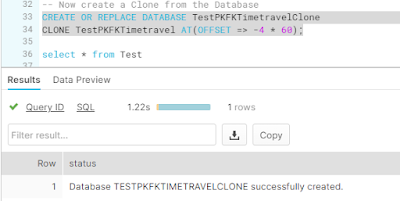
CREATE OR REPLACE DATABASE TestPKFKTimetravelClone
CLONE TestPKFKTimetravel AT(OFFSET => -4 * 60);


This results in a clone of the database before the deletion of the table (and timing is essential here ;-)).


Ok, let's query the table and see whether we have the data back.


USE DATABASE TestPKFKTimetravelClone;

select * from Test;


Resulting in the following information according to the folowing screendump :


Wow, that looks great! We have our table and our data back. But now comes the caveat. The constraints are gone!


SELECT GET_DDL('Table', 'Test')


Results in :


And here is the output of GET_DDL() statement :


create or replace TABLE TEST (
	ID NUMBER(38,0) NOT NULL
);


Conclusion 1

The constraint is gone! Why does this happen? Well, from the documentation  about constraints of Snowflake I read the following : "For Snowflake Time Travel, when previous versions of a table are copied, the current version of the constraints on the table are used because Snowflake does not store previous versions of constraints in table metadata.". Although here is stated that it is applicable on tables, it seems applicable on databases clones too. That is interesting! So when you want to timetravel with a table (or database) you need to be aware of changing constraints. So you can't be compliant when you want to time travel over a database. You need to be aware what the state of the constraint was at the moment of the time travel. 


Let's experiment a bit more with timetravelling and constraints to learn more about this 'feature'.


Experiment 2 : Change the constraint and travel back in time

What will happen when the constraint is changed and you use time travel functionality of Snowflake? Let's experiment with this. First setup the database.


ALTER WAREHOUSE IF EXISTS COMPUTE_WH RESUME IF SUSPENDED;

USE ROLE SYSADMIN;
USE WAREHOUSE Compute_WH;

CREATE OR REPLACE DATABASE TestPKFKTimetravel2;

USE DATABASE TestPKFKTimetravel2;

CREATE OR REPLACE TABLE Test (
  id integer,
  name varchar,
  PRIMARY KEY (id));

INSERT INTO Test(id, name) VALUES(1, 'Hennie');

select * from Test;

SELECT GET_DDL('Table', 'Test');


And, the GET_DDL() statement results in the following DDL script for the table Test :


create or replace TABLE TEST (
	ID NUMBER(38,0) NOT NULL,
	NAME VARCHAR(16777216),
	primary key (ID)
);


A primary key on the ID kolom.


Now let's change the PK on the table from the column 'id' to 'name'.


ALTER TABLE Test DROP PRIMARY KEY;
ALTER TABLE Test ADD PRIMARY KEY (name);

SELECT GET_DDL('Table', 'Test');


And check the DDL again to make sure that the PK has changed from ID to name.


create or replace TABLE TEST (
	ID NUMBER(38,0) NOT NULL,
	NAME VARCHAR(16777216),
	primary key (NAME)
);


Let's clone the database again from before the change of the constraint. Offcourse timing is essential here.


CREATE OR REPLACE DATABASE TestPKFKTimetravelClone2
CLONE TestPKFKTimetravel2 AT(OFFSET => - 3 * 60);


Let's go back to the clone and see what GET_DDL() is giving back as a result:


create or replace TABLE TEST (
	ID NUMBER(38,0) NOT NULL,
	NAME VARCHAR(16777216)
);


NO PK! This seems to be in contrast with the statement of Snowflake : "For Snowflake Time Travel, when previous versions of a table are copied, the current version of the constraints on the table are used because Snowflake does not store previous versions of constraints in table metadata.". 


Conclusion 2

This is also something I didn't expect from the experiment. It seems that when you time travel and clone no constraint is applied(?!). The constraint seems to be gone.


Experiment 3 : Just go back in time, clone and check the constraint

The previous experiment does me wonder whether the constraint is properly stored in the metadata for timetravelling. Just to make sure whether this is working correclty is set up this experiment with time travelling with Snowflake.


ALTER WAREHOUSE IF EXISTS COMPUTE_WH RESUME IF SUSPENDED;

USE ROLE SYSADMIN;
USE WAREHOUSE Compute_WH;

CREATE OR REPLACE DATABASE TestPKFKTimetravel3;

USE DATABASE TestPKFKTimetravel3;

CREATE OR REPLACE TABLE Test (
  id integer,
  name varchar,
  PRIMARY KEY (id));

INSERT INTO Test(id, name) VALUES(1, 'Hennie');

select * from Test;

SELECT GET_DDL('Table', 'Test');


And as expected we have a correct DDL of the table.


create or replace TABLE TEST (
	ID NUMBER(38,0) NOT NULL,
	NAME VARCHAR(16777216),
	primary key (ID)
);


Okay, now let's time travel and see whether the PK is still present in the clone. 


CREATE OR REPLACE DATABASE TestPKFKTimetravelClone3
CLONE TestPKFKTimetravel3 AT(OFFSET => - 60);

USE DATABASE TestPKFKTimetravelClone3;
select * from Test;
SELECT GET_DDL('Table', 'Test')


This is the result of the GET_DDL() statement.


create or replace TABLE TEST (
	ID NUMBER(38,0) NOT NULL,
	NAME VARCHAR(16777216),
	primary key (ID)
);


And here we have the constraint. It is still here.


Conclusion 3

When nothing changes with constraints of a table during time, timetravel will return the right constraint back.


Experiment 4 : Just clone and see what happens with the constraints

Just to make sure whether clones works correctly, I setup the following experiment with a clone of a database, change the constraints and see if they don't interfere with each other. Just to make sure whether it works as expected.


We setup another experiment with a database, we create a table with a PK and query the DDL with GET_DDL().


ALTER WAREHOUSE IF EXISTS COMPUTE_WH RESUME IF SUSPENDED;

USE ROLE SYSADMIN;
USE WAREHOUSE Compute_WH;

--Setup the base database
CREATE OR REPLACE DATABASE TestPKFKTimetravel4;
USE DATABASE TestPKFKTimetravel4;
CREATE OR REPLACE TABLE Test (
  id integer,
  name varchar,
  PRIMARY KEY (id));
INSERT INTO Test(id, name) VALUES(1, 'Hennie');
SELECT GET_DDL('Table', 'Test')


This results in a database with a table with a constraint.  The GET_DDL() statement gives the following result :


create or replace TABLE TEST (
	ID NUMBER(38,0) NOT NULL,
	NAME VARCHAR(16777216),
	primary key (ID)
);


PK is on the ID column the table Test.


The next step is to create a clone of the database and check the DDL of the table.


CREATE OR REPLACE DATABASE TestPKFKTimetravelClone4 CLONE TestPKFKTimetravel4;
USE DATABASE TestPKFKTimetravelClone4;
select * from Test;
SELECT GET_DDL('Table', 'Test');


And this results in the same DDL as expected :


create or replace TABLE TEST (
	ID NUMBER(38,0) NOT NULL,
	NAME VARCHAR(16777216),
	primary key (ID)
);


Now change the DDL in the original database.


USE DATABASE TestPKFKTimetravel4;
ALTER TABLE Test DROP PRIMARY KEY;
ALTER TABLE Test ADD PRIMARY KEY (name);
SELECT GET_DDL('Table', 'Test')


And this results in the following DDL code :


create or replace TABLE TEST (
	ID NUMBER(38,0) NOT NULL,
	NAME VARCHAR(16777216),
	primary key (NAME)
);


So, the PK in the original database is on NAME and the PK in the clone database is on ID. Let's find out whether this is still true.


USE DATABASE TestPKFKTimetravelClone4;
SELECT GET_DDL('Table', 'Test')


Resulting in :


create or replace TABLE TEST (
	ID NUMBER(38,0) NOT NULL,
	NAME VARCHAR(16777216),
	primary key (ID)
);


Yes, so this is still true. The primary key in the original database is 'id' and in the clone database is based on 'name'.


Now, lets go back to original database and drop the table.


USE DATABASE TestPKFKTimetravel4;
DROP TABLE test;
SELECT GET_DDL('Table', 'Test')


The table doesn'exist anymore.

SQL compilation error: Table 'TEST' does not exist or not authorized.


And then go back to the clone and see what the status is in the clone:


USE DATABASE TestPKFKTimetravelClone4;
select * from Test;
SELECT GET_DDL('Table', 'Test')


Resulting in the following DDL :


create or replace TABLE TEST (
	ID NUMBER(38,0) NOT NULL,
	NAME VARCHAR(16777216),
	primary key (ID)
);


The primary key on the table is still based on the column 'id'. Next step is to replace the original database with the clone.


DROP DATABASE IF EXISTS TestPKFKTimetravel4;
ALTER DATABASE IF EXISTS TestPKFKTimetravelClone4 RENAME TO TestPKFKTimetravel4;

USE DATABASE TestPKFKTimetravel4;
select * from Test;
SELECT GET_DDL('Table', 'Test')


Results in :


create or replace TABLE TEST (
	ID NUMBER(38,0) NOT NULL,
	NAME VARCHAR(16777216),
	primary key (ID)
);


And now we have the table back as we original started with. 


Conclusion 4

We cloned the database, we changed the constraints in the original database, and we restored the clone back to the original database and the PK is back on track. This seems to work all as expected. The metadata of the constraints is separated between the original and the clone database.


Final thoughts 

The experience we had with timetravel and constraints made us wonder about the inner workings of timetravel, cloning and constraints. We were a bit surprised with the lack of constraints when we cloned a databased from an earlier time with time travel. And still, it seems that when something changes with the constraints you can't rely on the table structure anymore. Only cloning seems to be reliable to go back time if you create a clone every day. Time travel doesn't seem to be a good alternative for differential backup/incremental backup and restore.


The whole script.


//=============================================================================
// Set context
//============================================================================

ALTER WAREHOUSE IF EXISTS COMPUTE_WH RESUME IF SUSPENDED;

USE ROLE SYSADMIN;
USE WAREHOUSE Compute_WH;

//=============================================================================
// Experiment 2 : Drop the table and time travel back to before the drop.
//============================================================================

CREATE OR REPLACE DATABASE TestPKFKTimetravel;

CREATE OR REPLACE TABLE Test (
  id integer,
  PRIMARY KEY (id));

INSERT INTO Test(id) VALUES(1);

-- WAIT 10 seconds
select * from Test at(offset => -10);

DROP TABLE IF EXISTS Test;
                   
select * from Test at(offset => -60);

-- Now create a clone from the Database
CREATE OR REPLACE DATABASE TestPKFKTimetravelClone
CLONE TestPKFKTimetravel AT(OFFSET => -4 * 60);

USE DATABASE TestPKFKTimetravelClone;

select * from Test;

SELECT GET_DDL('Table', 'Test');

ALTER WAREHOUSE IF EXISTS COMPUTE_WH SUSPEND;

//=============================================================================
// Experiment 2 : Change the PK from id to name and travel back in time
//=============================================================================
ALTER WAREHOUSE IF EXISTS COMPUTE_WH RESUME IF SUSPENDED;

USE ROLE SYSADMIN;
USE WAREHOUSE Compute_WH;

CREATE OR REPLACE DATABASE TestPKFKTimetravel2;

USE DATABASE TestPKFKTimetravel2;

CREATE OR REPLACE TABLE Test (
  id integer,
  name varchar,
  PRIMARY KEY (id));

INSERT INTO Test(id, name) VALUES(1, 'Hennie');

select * from Test;

SELECT GET_DDL('Table', 'Test');

-- Change the Primary Key to name
ALTER TABLE Test DROP PRIMARY KEY;
ALTER TABLE Test ADD PRIMARY KEY (name);

SELECT GET_DDL('Table', 'Test');
--DROP TABLE IF EXISTS Test;
                   
select * from Test at(offset => -60);

-- Now create a clone from the Database
CREATE OR REPLACE DATABASE TestPKFKTimetravelClone2
CLONE TestPKFKTimetravel2 AT(OFFSET => - 3 * 60);

USE DATABASE TestPKFKTimetravelClone2;
select * from Test;
SELECT GET_DDL('Table', 'Test')

ALTER WAREHOUSE IF EXISTS COMPUTE_WH SUSPEND;


//=============================================================================
// Experiment 3 : Just go back in time, clone and check the constraint
//=============================================================================
ALTER WAREHOUSE IF EXISTS COMPUTE_WH RESUME IF SUSPENDED;

USE ROLE SYSADMIN;
USE WAREHOUSE Compute_WH;

CREATE OR REPLACE DATABASE TestPKFKTimetravel3;

USE DATABASE TestPKFKTimetravel3;

CREATE OR REPLACE TABLE Test (
  id integer,
  name varchar,
  PRIMARY KEY (id));

INSERT INTO Test(id, name) VALUES(1, 'Hennie');

select * from Test;

SELECT GET_DDL('Table', 'Test');
                  
select * from Test at(offset => -60);

-- Now create a clone from the Database
CREATE OR REPLACE DATABASE TestPKFKTimetravelClone3
CLONE TestPKFKTimetravel3 AT(OFFSET => - 60);

USE DATABASE TestPKFKTimetravelClone3;
select * from Test;
SELECT GET_DDL('Table', 'Test')

ALTER WAREHOUSE IF EXISTS COMPUTE_WH SUSPEND;


//=============================================================================
// Experiment 4 : Just clone and see what happens with the constraints
//=============================================================================
ALTER WAREHOUSE IF EXISTS COMPUTE_WH RESUME IF SUSPENDED;

USE ROLE SYSADMIN;
USE WAREHOUSE Compute_WH;

--Setup the base database
CREATE OR REPLACE DATABASE TestPKFKTimetravel4;
USE DATABASE TestPKFKTimetravel4;
CREATE OR REPLACE TABLE Test (
  id integer,
  name varchar,
  PRIMARY KEY (id));
INSERT INTO Test(id, name) VALUES(1, 'Hennie');
SELECT GET_DDL('Table', 'Test')

//-- Change the Primary Key to name
//ALTER TABLE Test DROP PRIMARY KEY;
//ALTER TABLE Test ADD PRIMARY KEY (name);
//SELECT GET_DDL('Table', 'Test')


-- Now create a clone from the Database
CREATE OR REPLACE DATABASE TestPKFKTimetravelClone4 CLONE TestPKFKTimetravel4;
USE DATABASE TestPKFKTimetravelClone4;
select * from Test;
SELECT GET_DDL('Table', 'Test');

-- Change the the PK of the original database
USE DATABASE TestPKFKTimetravel4;
ALTER TABLE Test DROP PRIMARY KEY;
ALTER TABLE Test ADD PRIMARY KEY (name);
SELECT GET_DDL('Table', 'Test')

-- Look at the clone and verify the contraints
USE DATABASE TestPKFKTimetravelClone4;
SELECT GET_DDL('Table', 'Test')

--Let's go back to the base database and drop the table
USE DATABASE TestPKFKTimetravel4;
DROP TABLE test;
SELECT GET_DDL('Table', 'Test')

-- Look at the clone and verify the contraints
USE DATABASE TestPKFKTimetravelClone4;
select * from Test;
SELECT GET_DDL('Table', 'Test')

DROP DATABASE IF EXISTS TestPKFKTimetravel4;
ALTER DATABASE IF EXISTS TestPKFKTimetravelClone4 RENAME TO TestPKFKTimetravel4;

USE DATABASE TestPKFKTimetravel4;
select * from Test;
SELECT GET_DDL('Table', 'Test')

--Shutdown the warehouse
ALTER WAREHOUSE IF EXISTS COMPUTE_WH SUSPEND;


maandag 29 november 2021

LATERAL joins in Snowflake

Introduction

I was studying the LATERAL JOIN construct in order to understand the joining methods of Snowflake and I stumbled upon the article of Dave Abercrombie called "HOW TO: LATERAL FLATTEN AND JSON TUTORIAL". A great article and explanations. I decided to use this article for this blogpost. I've included his demo queries in the this article and investigated the query profiles. 


Prerequisites

First let's setup the demo database with this script.

//=============================================================================
// Set context
//============================================================================

ALTER WAREHOUSE IF EXISTS COMPUTE_WH RESUME IF SUSPENDED;

USE ROLE SYSADMIN;
USE WAREHOUSE Compute_WH;

//=============================================================================
// Setup of the experiment
//=============================================================================

DROP DATABASE IF EXISTS LATERALFLATTEN;

CREATE OR REPLACE DATABASE LATERALFLATTEN;
USE DATABASE LATERALFLATTEN;

CREATE TABLE IF NOT EXISTS snowflake_lateral_test_dept (
    DEPT_ID int,
    DEPT_NAME string
);

INSERT INTO snowflake_lateral_test_dept (DEPT_ID, DEPT_NAME) VALUES (1, 'A'), (2, 'B'), (3, 'C'), (4, 'D');

SELECT * FROM snowflake_lateral_test_dept

CREATE TABLE IF NOT EXISTS snowflake_lateral_test_emp (EMP_ID int, DEPT_ID int, AGE NUMBER, HEIGHT NUMBER, WEIGHT NUMBER)

INSERT INTO snowflake_lateral_test_emp (EMP_ID, DEPT_ID, AGE, HEIGHT, WEIGHT) VALUES
(1, 1, 25.5, 1025.7, 152.3),
(2 , 1 , 26.9 , 963.3 , 151.4),
(3 , 1 , 25.8 , 1042.7 , 149.6),
(4 , 1 , 26.3 , 1003.3 , 153.7),
(5 , 1 , 23 , 1020.8 , 151.8),
(6 , 1 , 23.5 , 985.3 , 150.1),
(7 , 2 , 32 , 1078.3 , 155.4),
(8 , 2 , 28.4 , 1142.9 , 156.4),
(9 , 2 , 30.2 , 1095.6 , 158),
(10 , 2 , 30.8 , 1089.2 , 158.4),
(11 , 2 , 29.6 , 1146.1 , 164.4),
(12 , 2 , 28.5 , 1089.4 , 164.6),
(13 , 3 , 35.5 , 1188.5 , 171.7),
(14 , 3 , 32.5 , 1235.6 , 169.4),
(15 , 3 , 37.1 , 1212.1 , 169.6),
(16 , 3 , 36.7 , 1224.9 , 168.7),
(17 , 3 , 34.1 , 1190.8 , 168.6),
(18 , 3 , 33.6 , 1177.5 , 173.2),
(19 , 4 , 40.1 , 1281.1 , 182.2),
(20 , 4 , 39.9 , 1306.7 , 180.6),
(21 , 4 , 38.1 , 1311.4 , 175.9),
(22 , 4 , 38.2 , 1287.4 , 184.4),
(23 , 4 , 39.1 , 1294.9 , 177.2),
(24 , 4 , 37.7 , 1320.1 , 179.9)

SELECT * FROM snowflake_lateral_test_emp


Just a normal join

The article starts with a normal join and an aggregate and the query returns a average per department, order by department


-- no subquery at all
  select d.dept_name,
            avg(e.age) as avg_age
      from snowflake_lateral_test_dept d
      join snowflake_lateral_test_emp e
        on d.dept_id = e.dept_id
group by 1
order by 1
;


Results in :


The following Query Profile (execution plan) represents the normal join construct. The JoinFilter is used for removing tuples that can be identified as not possibly matching the condition of a Join further in the query plan. I'm not sure what the purpose is here, it seems that the same number of rows is going in and out (24).


Common Table Expression

With a CTE you can break up the query in procedural parts and it makes queries more readable. Here is the example I borrowed from Dave's article.


with sub as (
 select dept_id,
            avg(age) as avg_age
      from snowflake_lateral_test_emp
group by dept_id
) -- --------------------------------
   select d.dept_name,
              sub.avg_age
    from snowflake_lateral_test_dept d
    join sub
      on d.dept_id = sub.dept_id
order by 1
;


Results in :


The Query Profile is as follows :


With a subquery

Here is an example with the subquery (not correlated).  As Dave explains the subquery is treated like a small table that is used as a inline view.

  select d.dept_name,
         sub.avg_age
   from snowflake_lateral_test_dept d,
        ( --sub
          select dept_id,
                 avg(age) as avg_age
           from snowflake_lateral_test_emp
        group by dept_id
        ) sub
   where d.dept_id = sub.dept_id
order by 1
;


Results in :


Here is the Query Profile and here you can see the two paths: one for the subquery (average) and one for the department:


Correlated subquery

And here is the example of the correlated subquery. 


select d.dept_name,
   ( -- correlated subquery
    select avg(e.age) as avg_age
     from snowflake_lateral_test_emp e
    where e.dept_id = d.dept_id
   ) as avg_age
 from snowflake_lateral_test_dept d
order by 1
;


Resulting in


And here is the Query profile for the correlated subquery. It is a bit different than the previous example. Here is a Filter predicate used with SUM(E.age) is NOT NULL and COUNT(E.AGE) IS NOT NULL.


Here you can see that the LATERAL FLATTEN predicate is used in the Query profile and is also used in the following example.

Lateral join with a correlated subquery

This is the example of the query with the LATERAL keyword. To my knowledge it seems comparable with the OUTER APPLY and the INNER APPLY construct of Microsoft SQL Server family code. I've written about this in this blogpost : joining tables with the OUTER APPLY.


 select d.dept_id,
        d.dept_name,
        e2.avg_age,
        e2.avg_height
    from snowflake_lateral_test_dept d,
 lateral ( -- correlated subquery
            select avg(e1.age) as avg_age,
                   avg(e1.height) as avg_height
              from snowflake_lateral_test_emp e1
             where e1.dept_id = d.dept_id
          ) e2
;


Results in 


With the following Query Profile : 


The LATERAL JOIN (and OUTER APPLY) becomes very handy when you want to return more than one column form the subquery (you have to add more subqueries to the query)

Conclusion

Here I've combined the different Query Profiles in the following diagram.


Hennie

vrijdag 27 augustus 2021

Conversion SQL datatypes to Snowflake datatypes

Introduction

I'm currently involved in a migration project from Azure SQL Database to Snowflake and I would like to share something that I've learned regarding the conversion of datatypes from Azure SQL Database. For this blogpost I used the Migration guide. So you'll see most of the same conversions in this blogpost, but with some small changes. For instance, in the migration guide "Datetime" is the Snowflake alternative for the SQL Database "Datetime" and that is not true. It is Timestamp_NTZ. 


Yet another thing I've added is that, although Snowflake doesn't use the SQL Server datatype, it recognizes the SQL Datatype and turns it into a Snowflake datatype. For instance, Snowflake understands "Datetime" and it will automatically convert into Timestamp_NTZ datatype. So, I've added the supported column : "Is the SQL Server datatype supported by Snowflake or not?" For instance, "Bit" is not recognized by Snowflake. I don't know why, but most of the SQL Server datatypes are recognized and converted into Snowflake datatypes.


This is also applicable for SQL Server and Azure Synapse


Azure SQL Database and Snowflake Datatypes

Here is the list of the Azure SQL Database datatypes that are supported or not and the Snowflake equivalent.


SQL SERVERSnowflakeComments

​

Supported

Preferred​

​

BIGINT ​

Y

NUMBER ​

Precision and scale not to be specified when using Numeric.​

BINARY​

Y

BINARY​

Snowflake: maximum length is 8 MB.​

BIT ​

N

BOOLEAN ​

Recommended: Use NUMBER if migrating value-to-value to capture the actual BIT value. Use Boolean in Snowflake if the desired outcome is to restrict to Ternary Logic (three valued): TRUE,  FALSE  or NULL (UNKNOWN).​

CHAR​

Y

VARCHAR(1)​

Any set of strings that is shorter than the maximum length is not space-padded at the end.​

DATE ​

Y

DATE​

Default in SQL Server is YYYY-MM-DD.​

DATETIME​

Y

TIMESTAMP_NTZ ​

SQL Server datetime is not ANSI or ISO 8501 compliant. Storage size is 8 bytes. Accuracy is rounded to increments of .000  .003 or .007.​

DATETIME2 ​

N

TIMESTAMP_NTZ ​

Snowflake: TIMESTAMP with no time zone time zone is not stored. DATETIME2 has a default precision of up to 7 digits Snowflake has TIMESTAMP_NTZ with the precision of 9 digits.​

DATETIMEOFFSET​

N

TIMESTAMP_LTZ​

SMALLDATETIME is not ANSI or ISO 8601 compliant. It has a fixed 4 bytes storage space. TIMESTAMP_LTZ Up to 34 7 in precision scale.​

DECIMAL ​

Y

NUMBER​

Default precision and scale are (38,0).​

FLOAT​

Y

FLOAT​

Snowflake uses double-precision (64-bit) IEEE 754 floating point numbers.​

IMAGE​

N

N/A​

Use NVARCHAR,  VARCHAR, or VARBINARY instead.​

INT ​

Y

NUMBER​

Precision and scale not to be specified when using Numeric.​

MONEY ​

N

NUMBER​

Money has a range of 19 digits with a scale of 4 digits, so NUMBER(19,4) can be used.​

NCHAR​

Y

VARCHAR(1)​

CHAR is used on fixed-length-string data​

NTEXT​

N

VARCHAR​

This data type will be discontinued on SQL Server. Use NVARCHAR,  VARCHAR, or VARBINARY instead.​

NUMERIC ​

Y

NUMBER​

Default precision and scale are (38,0).​

NVARCHAR​

Y

VARCHAR​

NVARCHAR’s string length can range from 1–4000.​

REAL ​

Y

FLOAT​

The ISO synonym for REAL is FLOAT(24).​

SMALLDATETIME ​

N

TIMESTAMP_NTZ ​

SMALLDATETIME is not ANSI or ISO 8601 compliant. It has a fixed 4 bytes storage space.​

SMALLINT​

Y

NUMBER​

Default precision and scale are (38,0).​

SMALLMONEY ​

N

NUMBER​

NUMBER with precision of 10 digits, with a scale of 4, so NUMBER(10,4) can be used.​

TEXT​

Y

VARCHAR​

This data type will be discontinued on SQL Server. Use NVARCHAR,  VARCHAR, or VARBINARY instead.​

TIME​

Y

TIME ​

SQL Server has a precision of 7 nanoseconds. Snowflake has precision of 9 nanoseconds​

TIMESTAMP​​

Y

TIMESTAMP_NTZ​

Use DATETIME2 or CURRENT_TIMESTAMP function.​

TINYINT​

Y

NUMBER​

Default precision and scale are (38,0).​

UNIQUEIDENTIFIER​

N

STRING​

Not Supported.​

VARBINARY​

Y

BINARY​

Snowflake: maximum length is 8 MB.​

VARCHAR​

Y

VARCHAR​

Any set of strings that are shorter than the maximum length is not space-padded at the end.


Final thoughts

This blogpost is a list of Azure SQL Database to Snowflake datatypes conversions 


Hennie de Nooijer

donderdag 15 juli 2021

Snowflake series : Differences between Microsoft SQL en Snowflake

Introduction

Although, there is lot of support for (ANSI) SQL support in Snowflake there are always the nittygritty things that I always assumed in Microsoft SQL doesn't work in Snowflake. This blogpost is a collection of these differences between Microsoft SQL. This applicable for SQL Server (on premise), Azure SQL Database and Azure Synapse. 


Azure SQL Database to Snowflake conversion issues

There are some differences with the comma between Microsoft SQL and Snowflake. It seems that Microsoft SQL is less strict with commas than Snowflake.


Azure SQL Database  (and other SQL Server versions)

In this example, there is NOT a comma between the NULL and the CONSTRAINT. To my surprise Microsoft SQL code is accepted.


DROP TABLE IF EXISTS dbo.test;

CREATE TABLE dbo.test(
    ID	      VARCHAR (50)  NOT NULL,
    Oms       VARCHAR (255)     NULL
    CONSTRAINT [PK_ID] PRIMARY KEY NONCLUSTERED (ID ASC)
);


Results in :


Snowflake 
But when I try this in Snowflake it is not accepted and it results in an error.

CREATE TABLE test(
    ID	      VARCHAR (50)  NOT NULL,
    Oms       VARCHAR (255)     NULL
    CONSTRAINT PK_ID PRIMARY KEY (ID)
);

Results in  :


Azure SQL Database  (and other SQL Server versions)

Another example is the following script. Look at the last line with , . Strange at first sight and I didn't expect that Microsoft SQL accepts kind of code, but surprise surprise, no errors.


DROP TABLE IF EXISTS dbo.test2;

CREATE TABLE dbo.test2(
    ID	      VARCHAR (50)  NOT NULL,
    oms       VARCHAR (255)     NULL,
);

Results in :


Snowflake 
The same code in Snowflake results in an error.

DROP TABLE IF EXISTS test2;

CREATE TABLE test2(
    ID	      VARCHAR (50)  NOT NULL,
    oms       VARCHAR (255)     NULL,
);

Results in :


Final thoughts 

This is a small blogpost about some experiences with converting Microsoft SQL code (SQL Server, Azure SQL Database and Synapse) to Snowflake.

Hennie