Downloading files from a FTP server is a common task and once in a while you need to configure this in SSIS. In SSIS you have a FTP task. Neat! No problem you think. Well there is a problem when you have a Secure FTP server. I'll explain this in the post below.
When you drag an FTP task from the toolbox in to the package and press create new connection you'll get the following screen:
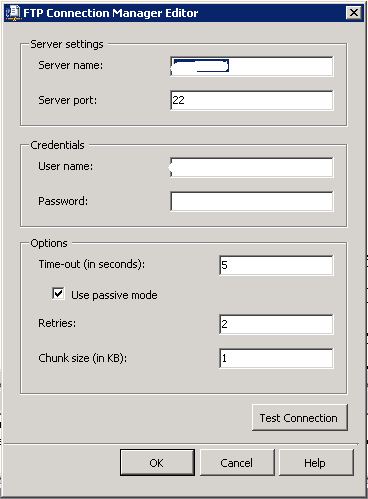
But this works only for unsecure FTP. When i tried to connect to the FTP server with FileZilla i noticed that there was an 's' before the 'ftp'. I didn't entered this myself but it appeared after i entered the servername.
After some googling i found out that the FTP task of SSIS doesn't support secure FTP. I checked Denali and the windows seems the same. So no improvements yet! I've seen the software SSIS utilities app but the price is way outside the range for this. I have found however the open source WinSCP tool that has a command line interface that can be used to complete this : http://winscp.net/eng/docs/scripting. I decided not to use the FTP task but to use the WinSCP tool together with 'Execute process task'. So in stalled WINSCP and tested the commandline option:
winscp.com /command "option batch on" "option confirm off" "option transfer ascii" "open <username>:<password>@<server>" "get * E:\SSIS\<project>\ImportFiles\*" "close" "exit"
and this works. So this is Execute Proces Task window.
Conclusion : I also had some troubles with the webservice task (due to limited functionality) and it seems that this component is also very limited and therefore you need 3rd party software which i normally don't prefer.
Greetz,
Hennie
woensdag 17 november 2010
dinsdag 16 november 2010
SSIS : Data correction component (Denali)
Hi,
I investigated a new component in SQL Server version 11 (Denali CTP1) and i want you to show some findings i have so far. The Data Correction component can be used in the dataflow task of SSIS. It seems that this component (together with Data Quality Services) is not completely released in this CTP version. I didn't know that when i started this post. Data Quality Services is acquired from Zoomix in 2008 by Microsoft. I've found some information on the MSDN site :
I added one source component with aid of the source assistent to the dataflow:
And i added one destination component with the destination assistent:
So i ended up with the following data flow task:
When i try to edit the Data correction component you'll see the following window:
Connecting to a database will show the following window :
And it gives me this error:
Pressing help will show the following error:
In the folder C:\Windows\Assembly i've found the following assemblies:
Clearly there are some indications that the SSIS team is working on it but it needs some furher improvements or is this an understatement?!
Greetz,
Hennie
I investigated a new component in SQL Server version 11 (Denali CTP1) and i want you to show some findings i have so far. The Data Correction component can be used in the dataflow task of SSIS. It seems that this component (together with Data Quality Services) is not completely released in this CTP version. I didn't know that when i started this post. Data Quality Services is acquired from Zoomix in 2008 by Microsoft. I've found some information on the MSDN site :
The Data Correction component can be found in the SSIS toolbox:
I added one source component with aid of the source assistent to the dataflow:
And i added one destination component with the destination assistent:
So i ended up with the following data flow task:
When i try to edit the Data correction component you'll see the following window:
Connecting to a database will show the following window :
And it gives me this error:
Pressing help will show the following error:
In the folder C:\Windows\Assembly i've found the following assemblies:
Clearly there are some indications that the SSIS team is working on it but it needs some furher improvements or is this an understatement?!
Update: Chriss Webb blog:
'We saw a lot more about Data Quality Services. DQS is a substantial new product that allows end users and BI developers to create rules about what data is valid in a given scenario, and then apply these rules to perform automated data cleansing; it’s not, apparently, a rebadged version of the Zoomix product that MS bought a while ago, it’s a lot more ambitious than that. Example scenarios include cleaning addresses by comparing them to a master address list, possibly sourced from the Azure Datamarket; using regular expressions to ensure that valid urls and stock ticker symbols were stored in a table containing information about companies; and using fuzzy matching on names and addresses to find groups of customers who live together in the same household. Although some people I talked to were a bit put off by the bug-ridden demo, I was quite impressed by what I saw – a lot of thought seemed to have gone into it and the UI looks good. I think there’ll be an SSIS component that will allow you to apply your rules within a data flow too, but that wasn’t shown.'
Greetz,
Hennie
maandag 15 november 2010
SSIS : naming convention and connection manager (bad practice)
In one of my projects we're developing a SSIS framework. In this framework we defined a template about how a SSIS package and project should look like. We defined also structured checkpointfiles, logfiles, exportfiles and importfiles with naming conventions. Currently i'm building a SSAS cube based on the logging and auditing tables and i'll blog about this in the future.
I blogged about this in earlier post:
- SSIS Framework (Part I)
- SSIS : indirect configuration and one configuration per connection in a configuration database.
- SSIS : Six Scenarios and a best practice for the SSIS Package Configurations.
I've adopted the naming convention of Jamie thomson and this works great. But maybe what i've done is not so good: I also used this naming convention for the connection manager. When a OLEDB datasource is used as source i named it OLE_SRC_AdventureWorks. It isn't a problem when you don't use a general configuration table in your project but when you do troubles come into town: It is possible to use a connection as a source and a destination! Really? ;-)
Therefore your naming convention for connections should be source and destination independent. Perhaps an obvious issue but it become a real issue when you store your connections in a general configuration table.
Greetz,
Hennie
vrijdag 12 november 2010
Blogging for 1 year now!
Hi,
Well, it's been quite a ride in the past year but i have to celebrate one thing :
I started a year ago. First in Dutch but later on in English. So i posted about 80 posts on different areas, but mostly regarding SQL Server and datawarehousing. I had about 2500 hits and probably i was responsible for the most part of it;-) Sometimes i struggled a bit with my english but i hope that it will improve in the future.
One question i didn't figured out yet, and probably i will never get an answer, but are developments going faster lately or am i more aware of this? In this year i've seen a huge amount of developments in SQL Server, cloud computing, Self Service BI, Governance, MDM, analytics, datavault, apps, and on top of that Chris webb descibes that OLAP cubes are gone, finito?! No more MDX but DAX?
After such a milestone it's always good to evaluate things and i have to say that i'm very pleased with blogging because it forces to think about certain things. How does it really works? What can i find more about this subject to get a better post? So i'll continu blogging in the future with a minimum of one post per week!
And offcourse i would like to thank my online- and offline contributors for this blog. Without them the blog would be less complete and of less quality. So thanks a lot!
Cheers,
Hennie
Well, it's been quite a ride in the past year but i have to celebrate one thing :
One year blogging!!!!!
I started a year ago. First in Dutch but later on in English. So i posted about 80 posts on different areas, but mostly regarding SQL Server and datawarehousing. I had about 2500 hits and probably i was responsible for the most part of it;-) Sometimes i struggled a bit with my english but i hope that it will improve in the future.
One question i didn't figured out yet, and probably i will never get an answer, but are developments going faster lately or am i more aware of this? In this year i've seen a huge amount of developments in SQL Server, cloud computing, Self Service BI, Governance, MDM, analytics, datavault, apps, and on top of that Chris webb descibes that OLAP cubes are gone, finito?! No more MDX but DAX?
After such a milestone it's always good to evaluate things and i have to say that i'm very pleased with blogging because it forces to think about certain things. How does it really works? What can i find more about this subject to get a better post? So i'll continu blogging in the future with a minimum of one post per week!
And offcourse i would like to thank my online- and offline contributors for this blog. Without them the blog would be less complete and of less quality. So thanks a lot!
Cheers,
Hennie
donderdag 11 november 2010
SQL Server version 11 CTP1 version is here (Denali)
9 november, the Microsoft® SQL Server® codenamed 'Denali' - Community Technology Preview 1 (CTP1) is released and RTM is scheduled for 2011. The tooling i like a lot is SSIS and luckily Microsoft released quite some improvements in SQL Server version 11 CTP:
- Release of a new deployment model. From MSDN : "The project deployment model provides the ability to define parameters for packages and projects. With this model, a project is the unit of deployment in Integration Services. Build your project, packages, and parameters to a project deployment file (.ispac extension) and deploy it directly to the SQL Server database engine. New dialog boxes in SQL Server Management Studio and a comprehensive set of Transact-SQL views and stored procedures help you manage, execute, and monitor your packages in real time."
- Object Impact and Data Lineage Analysis : From MSDN : "You can now view information about impact and data lineage between supported Integration Services objects that are deployed to the server and supported SQL Server SQL Serverobjects. You extract impact and data linage metadata about Integration Services and SQL Server objects by using extraction points. You use this information to troubleshoot the behavior of an object, such as a slow-running package or a package that does not run, and to anticipate how changes to one object can affect another object
- Usability Enhancements: From MSDN : "Business Intelligence Development Studio has been updated to help new and experienced users develop packages more easily. A new Integration Services toolbox, designer refinements, and other usability enhancements help new users become productive quickly."
- Reduced Memory Usage by the Merge and Merge Join Transformations. In a former post i compared this with the lookup join and i was not very enthousiastic about the Merge join. Microsoft apparantly still believes that Merge join is still going strong.
- SSIS : New Data Correction Component. A new component for data quality improvements.
And other improvements:
- Crescent : the code name of an ad-hoc reporting layer that will be released in the next version of SQL Server – Denali. Crescent is a major enhancement to Reporting Services and Microsoft Self-Service BI strategy. Crescent will change normal eporting behaviour and it will make the reporting experience more interactive and similar to Excel PivotTable and tools from other vendors, such as Tableau. So, Crescent is a code name for a new web-based fusion between SSRS and PowerPivot (to be more accurate Analysis Services in VertiPaq mode).
So i installed Denali and the standard installation is quite easy. Installing is a lot like SQL Server 2008 R2
The only i problem i had was that powershell 2.0 was not installed. At first it was a warning:
But later on it became an error:
So i installed powershell 2.0. During the installation i saw the following information. Visual studio 2008 and visual studio 2010 are installed?!
Everything went well and i started up management studio and the look and feel is a bit different i noticed. It appears to me that the look an feel is more like visual studio.
The next thing i did was installing the Denali adventureWorks databases. This went very smooth. No problems here. Then i started visual studio and created a SSIS project. And also the look and feel also changed here. The toolbox is reorganized. Below you can see the control toolbox.
Below you can see the dataflow toolbox. The new datacorrection component is there!
Right below on the screen a slider is introduced and this is for zooming in and zooming out.
Next time more about Denali.
Greetz,
Hennie
Abonneren op:
Posts (Atom)


