dinsdag 23 november 2010

SSIS : Catalogs and Denali

Today, i want to talk about the catalog.The catalog is used in the new deployment model of Denali. There are four stages of the project deployment life cycle:
  1. Build: Prepares your project for deployment.
  2. Deploy: Adds your project to the Integration Services catalog on an instance of SQL Server.
  3. Import: Loads a project into BIDS from the Integration Services catalog or a project deployment file.
  4. Migrate: Converts legacy packages and configurations so that they can be used in the project deployment model.
As Jamie Thomson states in his blog, the SSIS server is no longer a separate service that you connect to, it now appears as a node in Object Explorer when connecting to a SQL Server database instance:

Before using the catalog you need to enable the CLR:

EXEC sp_configure 'show advanced options' , '1';
reconfigure;
EXEC sp_configure 'clr enabled' , '1' ;
reconfigure;
EXEC sp_configure 'show advanced options' , '0';
reconfigure;

and now it's possible to create the Catalog in the SSMS:


You can create only one catalog per SQL Server instance. The database is always called SSISDB. It would be great if this could be changed in the future release of Denali. This would create flexibility in corporate naming convention.

It's possible to create multiple environments and according to the Technet wiki  an environment is a container of variables that can be referenced by Integration Services projects. Each project can have multiple environment references, but a single instance of package execution can only reference variables from a single environment. Environments allow you to organize the values that you assign to a package. For example, you might have environments named "Dev", "Test", and "Production". Something like this:


At the center of the project deployment model is the project deployment file (.ispac extension). The project deployment file is a self-contained unit of deployment that includes only the essential information about the packages and parameters in the project. Okay lets build this thing! An..ispac file is created in the bin folder.

So how do deploy your solution and packages into the catalog. Well there is a deployment option in BIDS. Right click on the project and choose 'deploy'. You have to walktrhough the wizard and following screens will appear:
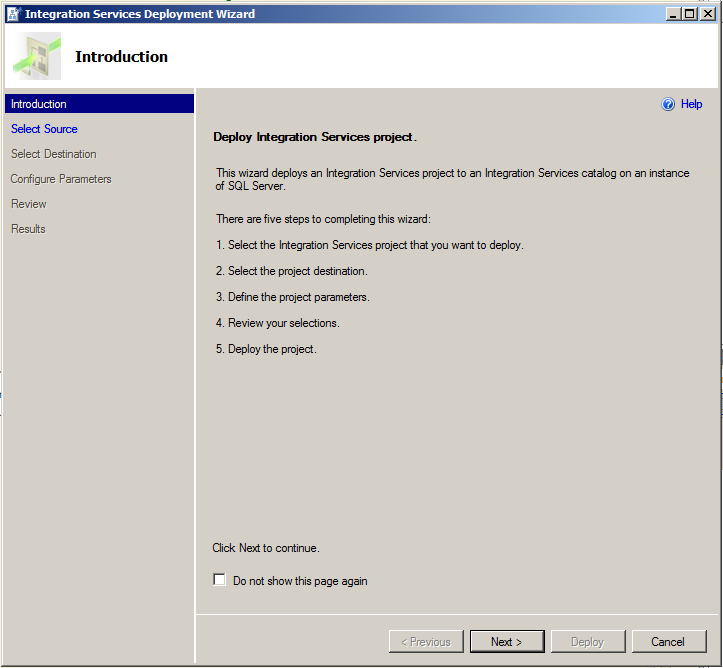

Choose the deployment file, that is created during the build, in the bin folder. When the project is deployed for the first time the first option should be choosed. The second time you can take the catalog deployment.


Choose integration services project where the deployment should take place. The message below indicates that project already exist ( i deployed it earlier)


In this window you can choose the parameters for the project. I'll look into this in the future.


Press next and following window showed that everything was deployed succesfully.


 The review window:


And now you can see that the project is deployed in the SSMS tree in the object explorer.


Conclusions:
  • I have enabled the CLR because the catalog uses CLR functions.
  • I have created the catalog.
  • I understand what environments are.
  • I have created a couple of environments in SSMS.
  • I have deployed a project from BIDS to SSMS catalog.

Greetz,
Hennie

donderdag 18 november 2010

SSIS : Importing a SQL Server 2008 package in Denali.

Hi, At this moment we are working with a framework in SQL Server 2008 and i was wondering whether we could import this framework in Denali. So i decided to import a package built in 2008 into Denali. Below you can see the errors:


There were three errors that were discovered by Denali:
  • Native client conversion error. Changed this to the right native client.
  • Missing environmentvariable. Ok that's clear.
  • Script component conversion error. For some reason the input column was lost. I needed to add this again. 
I noticed that protectionlevel is also changed to EncryptSensitiveWithUserKey from Don'tSaveSensitive.I had to change the query in the source adapter and therefore an error appears on the screen. I needed to map some fields again. I deleted them in the source query and therefore i deleted them from the dataflow.


And the followin window appears:


I corrected all the errors and then i tried to execute the package. The following window appears:


Okay! Well reading jamie thomson blog about Projects tells me that i have to build the project first. Okay. Lets build this thing! Woops. Yet another error occurs:


As it seems there now multiple projectproperties like Protection level in Denali. When you set these to certain values a newly created package will take this projectproperty as by default. I compared the project properties with SQL Server 2008 (i installed on environment BIDS helper) :


Left is Denali and right is 2008. New are the common properties.

I changed the protection level in order to get the protection level of the project the same as the package. Let's build. Now it succeeds! Two folders are created in the solution folder: obj and bin and in the bin folder you can find now an ispac file. This is a ZIP file and when i unzip this the following files are visible:

Three files are visible: 
  • @project.manifest.
  • [Content_Types].xml.
  • package.
Opening the  @project.manifest file will show:


and opening the [Content_Types].xml will show this


It seems that the execution of the package is allowed now and below you can see the result. My first package executed in Denali:


Conclusion:
  • You need to build the package before you can execute this. 
  • A deployment file is created (.ispac) with at least 3 files in it zipped.
Gr,
Hennie

woensdag 17 november 2010

SSIS : Secure FTP and SSIS?

Downloading files from a FTP server is a common task and once in a while you need to configure this in SSIS. In SSIS you have a FTP task. Neat! No problem you think. Well there is a problem when you have a Secure FTP server. I'll explain this in the post below.

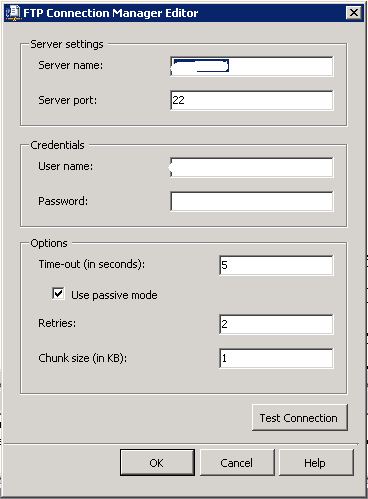
When you drag an FTP task from the toolbox in to the package and press create new connection you'll get the following screen:


But this works only for unsecure FTP. When i tried to connect to the FTP server with FileZilla i noticed that there was an 's' before the 'ftp'. I didn't entered this myself but it appeared after i entered the servername.


After some googling i found out that the FTP task of SSIS doesn't support secure FTP. I checked Denali and the windows seems the same. So no improvements yet! I've seen the software SSIS utilities app but the price is way outside the range for this. I have found however the open source WinSCP tool that has a command line interface that can be used to complete this : http://winscp.net/eng/docs/scripting. I decided not to use the FTP task but to use the WinSCP tool together with 'Execute process task'. So in stalled WINSCP and tested the commandline option:


winscp.com /command "option batch on" "option confirm off" "option transfer ascii" "open <username>:<password>@<server>" "get * E:\SSIS\<project>\ImportFiles\*" "close" "exit"
and this works. So this is Execute Proces Task window.


Conclusion : I also had some troubles with the webservice task (due to limited functionality) and it seems that this component is also very limited and therefore you need 3rd party software which i normally don't prefer.

Greetz,
Hennie

dinsdag 16 november 2010

SSIS : Data correction component (Denali)

Hi,

I investigated a new component in SQL Server version 11 (Denali CTP1) and i want you to show some findings i have so far. The Data Correction component can be used in the dataflow task of SSIS. It seems that this component (together with Data Quality Services) is not completely released in this CTP version. I didn't know that when i started this post. Data Quality Services is acquired from Zoomix in 2008 by Microsoft. I've found some information on the MSDN site :
The Data Correction component can be found in the SSIS toolbox:


I added one source component with aid of the source assistent to the dataflow:


And i added one destination component with the destination assistent:


So i ended up with the following data flow task:


When i try to edit the Data correction component you'll see the following window:


Connecting to a database  will show the following window :


 And it gives me this error:


Pressing help will show the following error:


In the folder C:\Windows\Assembly i've found the following assemblies:


Clearly there are some indications that the SSIS team is working on it but it needs some furher improvements or is this an understatement?!


Update: Chriss Webb blog:

'We saw a lot more about Data Quality Services. DQS is a substantial new product that allows end users and BI developers to create rules about what data is valid in a given scenario, and then apply these rules to perform automated data cleansing; it’s not, apparently, a rebadged version of the Zoomix product that MS bought a while ago, it’s a lot more ambitious than that. Example scenarios include cleaning addresses by comparing them to a master address list, possibly sourced from the Azure Datamarket; using regular expressions to ensure that valid urls and stock ticker symbols were stored in a table containing information about companies; and using fuzzy matching on names and addresses to find groups of customers who live together in the same household. Although some people I talked to were a bit put off by the bug-ridden demo, I was quite impressed by what I saw – a lot of thought seemed to have gone into it and the UI looks good. I think there’ll be an SSIS component that will allow you to apply your rules within a data flow too, but that wasn’t shown.'


Greetz,
Hennie

maandag 15 november 2010

SSIS : naming convention and connection manager (bad practice)

In one of my projects we're developing a SSIS framework. In this framework we defined a template about how a SSIS package and project should look like. We defined also structured checkpointfiles, logfiles, exportfiles and importfiles with naming conventions. Currently i'm building a SSAS cube based on the logging and auditing tables and i'll blog about this in the future.


I blogged about this in earlier post:
I've adopted the naming convention of Jamie thomson and this works great. But maybe what i've done is not so good: I also used this naming convention for the connection manager. When a OLEDB datasource is used as source i named it OLE_SRC_AdventureWorks. It isn't a problem when you don't use a general configuration table in your project but when you do troubles come into town: It is possible to use a connection as a source and a destination! Really? ;-)

Therefore your naming convention for connections should be source and destination independent. Perhaps an obvious issue but it become a real issue when you store your connections in a general configuration table.

Greetz,
Hennie