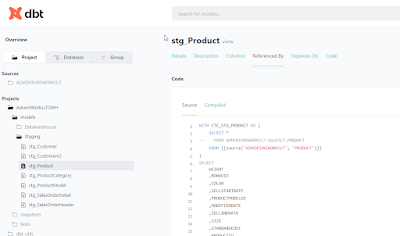
Wow, I finally managed to pass the exam of DBT Developer certification. I failed two times first because I didn't had much of handson experience with DBT. That will change in the future. So, I had to learn everything from the documentation and from a lot of Udemy tests. Although the tests available on the internet doesn't completely cover the questions on the real exam of DBT, it helped a lot to understand DBT. I did that by researching the answers, googling and reading the documentation of DBT. Last but not least I practiced a bit with DBT on a small mock-up project that I've created.
vrijdag 16 februari 2024
Certified DBT Developer certification
zaterdag 30 december 2023
Ephemeral tables in DBT (Part XI)
Introduction
In this blogpost we're going to take a look at a specific type of a materialization, known as ephemeral. According to DBT : materializations are strategies for persisting dbt models in a warehouse. There are five types of materializations built into dbt. They are:
- table
- view
- incremental
- ephemeral
- materialized view
This blogpost is a blogpost in a serie of blogposts :
- Build a data warehouse with DBT and Snowflake on AdventureWorksLT (PART I)
- Build Staging and Dimensions in DBT for Snowflake (PART II)
- Sources in DBT for Snowflake (PART III)
- Data freshness for DBT in snowflake (Part IV)
- Snapshots in DBT for Snowflake (Part V)
- Generic tests in DBT for Snowflake (PART VI)
- Singular tests in DBT for Snowflake (Part VII)
- Add packages to your DBT project (Part VIII)
- Adding documentation to your DBT project (Part IX)
- Working with hooks in DBT (Part X)
- Ephemeral tables in DBT (Part XI)
Ephemeral example
Final thoughts
vrijdag 29 december 2023
dbt Analytics Engineering Certification Exam cheatsheet
Introduction
I'm preparing for the DBT exam and I used the "dbt Analytics Engineering Certification Exam Study Guide" for searching for more information about the topics covered in the exam. I stored the links that I used in this blogpost, just helping you too. I hope you enjoy it.
I'll frequently update this blogpost. I just started with a couple of topics.
Topic 1: Developing dbt models
- Identifying and verifying any raw object dependencies
- Understanding core dbt materializations
- Conceptualizing modularity and how to incorporate DRY principles
- Converting business logic into performant SQL queries
- Business logic in DBT
- Refactoring legacy SQL to dbt
- How dbt Can Help Solve 4 Common Data Engineering Pain Points
- Using commands such as run, test, docs and seed
- Creating a logical flow of models and building clean DAGs
- Data modeling techniques for more modularity
- How we structure our dbt projects
- dbt DAG: Definition, Usage, and Examples
- Defining configurations in dbt_project.yml
- Configuring sources in dbt
- Using dbt Packages
Topic 2: Debugging data modeling errors
- Understanding logged error messages
- Troubleshooting using compiled code
- Troubleshooting .yml compilation errors
- Distinguishing between a pure SQL and a dbt issue that presents itself as a SQL issue
- Developing and implementing a fix and testing it prior to merging
Topic 3: Monitoring data pipelines
- Understanding and testing the warehouse-level implications of a model run failing at different points in the DAG
- Understanding the general landscape of tooling
Topic 4: Implementing dbt tests
- Using generic, singular and custom tests on a wide variety of models and sources
- Understanding assumptions specific to the datasets being generated in models and to the raw data in the warehouse
- Implementing various testing steps in the workflow.
- Ensuring data is being piped into the warehouse and validating accuracy against baselines
Topic 5: Deploying dbt jobs
- Understanding the differences between deployment and development environments
- Configuring development and deployment environments
- Configuring the appropriate tasks, settings and triggers for the job
- Understanding how a dbt job utilizes an environment in order to build database objects and artifacts
- Using dbt commands to execute specific models
Topic 6: Creating and Maintaining dbt documentation
- Updating dbt docs
- Implementing source, table, and column descriptions in .yml files
- Using dbt commands to generate a documentation site
- Using macros to show model and data lineage on the DAG
Topic 7: Promoting code through version control
- Understanding concepts and working with Git branches and functionalities
- Creating clean commits and pull requests
- Merging code to the main branch
Topic 8: Establishing environments in data warehouse for dbt
- Understanding environment’s connections
- Understanding the differences between production data, development data, and raw data
Working with hooks in DBT (Part X)
Introduction
In one of my projects I've built a logging mechanism with stored procedures in Snowflake. It will log the start of a run, the start of load procedure, the end of the load procedure and the end of the run. You can do this also with hooks in DBT.
From DBT docs : Hooks are snippets of SQL that are executed at different times:
- pre-hook: executed before a model, seed or snapshot is built.
- post-hook: executed after a model, seed or snapshot is built.
- on-run-start: executed at the start of dbt build, dbt compile, dbt docs generate, dbt run, dbt seed, dbt snapshot, or dbt test.
- on-run-end: executed at the end of dbt build, dbt compile, dbt docs generate, dbt run, dbt seed, dbt snapshot, or dbt test.
This blogpost is a blogpost in a serie of blogposts :
- Build a data warehouse with DBT and Snowflake on AdventureWorksLT (PART I)
- Build Staging and Dimensions in DBT for Snowflake (PART II)
- Sources in DBT for Snowflake (PART III)
- Data freshness for DBT in snowflake (Part IV)
- Snapshots in DBT for Snowflake (Part V)
- Generic tests in DBT for Snowflake (PART VI)
- Singular tests in DBT for Snowflake (Part VII)
- Add packages to your DBT project (Part VIII)
- Adding documentation to your DBT project (Part IX)
- Working with hooks in DBT (Part X).
Hooks
--Auditing
CREATE TABLE IF NOT EXISTS RUN (
RUN_ID INT AUTOINCREMENT START 1 INCREMENT 1,
RUN_STARTDATE TIMESTAMP_NTZ,
RUN_ENDDATE TIMESTAMP_NTZ
);
CREATE TABLE IF NOT EXISTS MESSAGE (
MESSAGE_ID INT autoincrement start 1 increment 1,
RUN_ID INT, -- Runnumber of the complete run
MESSAGE_STATUS STRING, -- START, END, ERROR, INTERMEDIATE
MESSAGE_DESCRIPTION STRING, -- Logging message or error message
MESSAGE_LOCATION STRING, -- Individual Stored procedurename
MESSAGE_LAYER STRING, -- Database layer : DATAVAULT, DATAMART
MESSAGE_AREA STRING, -- Subject Area : LEGACY, FINANCE, etc
MESSAGE_LEVEL NUMBER, -- Stored procedure level : 1 = MASTER, 50 = DATAVAULT or DATAMART, 100 = Low level stored procedure
MESSAGE_DATE TIMESTAMP_NTZ, -- Date of logging
MESSAGE_ROWCNT NUMBER -- Affected rows of SQL executed
);Now, I'm not rebuilding the complete logic into DBT, but I will take some key elements of the logging and build that into DBT.
on-run-start: "INSERT INTO RUN (RUN_STARTDATE) SELECT CURRENT_TIMESTAMP();"
on-run-end: "INSERT INTO RUN (RUN_STARTDATE) SELECT CURRENT_TIMESTAMP();"And then run the following command in the project folder :
dbt run -m Dim_CustomerResulting in the following :
How does it look in Snowflake when the command has been executed?
Now the lets check the other hooks in DBT : pre-hook and post-hook. Here I added some code in the dbt_project.yml file : "INSERT INTO MESSAGE table".
dbt run -m Dim_CustomerFinal thoughts
donderdag 28 december 2023
Adding documentation to your DBT project (Part IX)
Introduction
Sometimes you get the question from a collegue about that he or she wants to know more about how a specific measure is generated. DBT has a documentation option you can use for this. Lets try this and I'll show this in this blogpost.
This blogpost is a blogpost in a serie of blogposts :
- Build a data warehouse with DBT and Snowflake on AdventureWorksLT (PART I)
- Build Staging and Dimensions in DBT for Snowflake (PART II)
- Sources in DBT for Snowflake (PART III)
- Data freshness for DBT in snowflake (Part IV)
- Snapshots in DBT for Snowflake (Part V)
- Generic tests in DBT for Snowflake (PART VI)
- Singular tests in DBT for Snowflake (Part VII)
- Add packages to your DBT project (Part VIII)
- Adding documentation to your DBT project (Part IX)
- Working with hooks in DBT (Part X)
- Ephemeral tables in DBT (Part XI)
Documentation
There are two important commands for documentation : generate and serve. Lets find out more about them. For using the documentation, you can add a description tag to your YAML files.
and here..
And then use the command dbt docs generate :
The next command is to use dbt docs serve :
And this will open a html page on your local machine :
All kind of information is available in the documentation. It's truly amazing.
Final thoughts
This is an amazing feature of DBT! You can easily generate the documentation with dbt docs
Hennie
Add packages to your DBT project (Part VIII)
Introduction
With DBT it's possible to add custom packages to your project. There are all kind of packages available at DBT Hubs. You can install them into your project. In this blogpost I show you how.
This blogpost is a blogpost in a serie of blogposts :
- Build a data warehouse with DBT and Snowflake on AdventureWorksLT (PART I)
- Build Staging and Dimensions in DBT for Snowflake (PART II)
- Sources in DBT for Snowflake (PART III)
- Data freshness for DBT in snowflake (Part IV)
- Snapshots in DBT for Snowflake (Part V)
- Generic tests in DBT for Snowflake (PART VI)
- Singular tests in DBT for Snowflake (Part VII)
- Add packages to your DBT project (Part VIII)
- Adding documentation to your DBT project (Part IX)
- Working with hooks in DBT (Part X)
- Ephemeral tables in DBT (Part XI)
Adding packages
First add a packages.yml file to your project:
Then go to DBT Hubs and navigate to dbutils
And add the following code to your packages file :
Your packages.yml file should look something like this :
The next step is run dbt deps to download the packages and the installation of dbt_utils.
And now a lot more features are available in your project for usage. You can find more information in the documentation about dbt_utils.
Final thoughts
maandag 25 december 2023
Singular tests in DBT for Snowflake (Part VII)
Introduction
Singular tests are tests that are not the same as standard tests. There are four standard tests but it is also possible to define your own tests in DBT. In this blogpost I show you the way how to do this in DBT.
This blogpost is a blogpost in a serie of blogposts :
- Build a data warehouse with DBT and Snowflake on AdventureWorksLT (PART I)
- Build Staging and Dimensions in DBT for Snowflake (PART II)
- Sources in DBT for Snowflake (PART III)
- Data freshness for DBT in snowflake (Part IV)
- Snapshots in DBT for Snowflake (Part V)
- Generic tests in DBT for Snowflake (PART VI)
- Singular tests in DBT for Snowflake (Part VII)
- Add packages to your DBT project (Part VIII)
- Adding documentation to your DBT project (Part IX)
- Working with hooks in DBT (Part X)
- Ephemeral tables in DBT (Part XI)
Singular test
I added a file to the test folder in the DBT project and I named it SalesOrderDetail_Qty_Greater_0.sql.
And the content of the file is the following SQL statement :
SELECT * FROM {{ref('stg_SalesOrderDetail')}} WHERE ORDERQTY > 0Generic tests in DBT for Snowflake (PART VI)
Introduction
This blogpost is a blogpost in a serie of blogposts :
- Build a data warehouse with DBT and Snowflake on AdventureWorksLT (PART I)
- Build Staging and Dimensions in DBT for Snowflake (PART II)
- Sources in DBT for Snowflake (PART III)
- Data freshness for DBT in snowflake (Part IV)
- Snapshots in DBT for Snowflake (Part V)
- Generic tests in DBT for Snowflake (PART VI)
- Singular tests in DBT for Snowflake (Part VII)
- Add packages to your DBT project (Part VIII)
- Adding documentation to your DBT project (Part IX)
- Working with hooks in DBT (Part X)
- Ephemeral tables in DBT (Part XI)
Example
models:
- name: stg_Product
columns:
- name: PRODUCTID
tests:
- unique
- not_null
- name: color
tests:
- accepted_values:
values: ['Red', 'Black', 'White', 'Blue', 'Multi', 'Yellow','Grey','Silver/Black', 'Silver']
- name: PRODUCTMODELID
tests:
- relationships:
to: ref('stg_ProductModel')
field: PRODUCTMODELIDAnd this is the result when I executed the dbt run
Two things surprised me at first :
- One is the productmodelid. There were two duplicate rows in the table. I checked it and its true.
- Second is the list of accepted values. There are NULLS in the table but it didn't fail on the list of values. May be I should have used the not_null constraint as I did with the ProductID column.
Final thoughts
zondag 24 december 2023
Snapshots in DBT for Snowflake (Part V)
Introduction
Snapshots in DBT are directly connected with Slow Changing Dimensions TYPE 2 (SCD). A snapshot in DBT tracks the differences in the data over a period of time and creating a history for every row. The confusing part here is that in Dimensional modelling you have two kinds of facts : tranactional and snapshots. A snapshot in dimensional modelling is copy of the source data for every day, week or month or whatever you want. So, DBT calls SCD2 dimensions snapshots, it calls SQL queries models... confusing ;-). Lets dive into DBT snapshots.
This blogpost is a blogpost in a serie of blogposts :
- Build a data warehouse with DBT and Snowflake on AdventureWorksLT (PART I)
- Build Staging and Dimensions in DBT for Snowflake (PART II)
- Sources in DBT for Snowflake (PART III)
- Data freshness for DBT in snowflake (Part IV)
- Snapshots in DBT for Snowflake (Part V)
- Generic tests in DBT for Snowflake (PART VI)
- Singular tests in DBT for Snowflake (Part VII)
- Add packages to your DBT project (Part VIII)
- Adding documentation to your DBT project (Part IX)
- Working with hooks in DBT (Part X)
- Ephemeral tables in DBT (Part XI)
Creating snapshots with DBT
CREATE SCHEMA snapshots;Create a file in the snapshots folder in your DBT project. I created one for Customer.
And put in the content of the file the following code :
{% snapshot Customer_Snapshot %}
{{
config(
target_database ='ADVENTUREWORKS_DWH',
target_schema ='snapshots',
unique_key ='CUSTOMERID',
strategy ='timestamp',
updated_at ='MODIFIEDDATE',
)
}}
select * from {{source('ADVENTUREWORKSLT', 'CUSTOMER')}}
{% endsnapshot %}Explanation :
- Give the snapshot a proper name, eg Customer_Snapshot.
- Define a target database, if you have multiple databases.
- Define the unique key, I would say the Business Key.
- Then the strategy, there are two options here : Check or timestamp. For 'timestamp' you need a column which indicates the change that happened with a certain record. The 'Check' option is used when you don't have this column in the source. I would always the 'check' option because I've been in numerous cases where the modified date is not reliable in a source system.
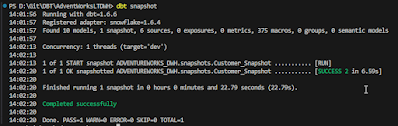
Compiling and building with the following command :
dbt snapshotAnd this results in :
Now, how does this looks like in Snowflake? The same table is created but with some extra columns at the end of the table : DBT_SCD_ID, DBT_UPDATED_AT, DBT_VALID_FROM and DBT_VALID_TO.
Now lets update a column in the source table and check whether this is reflected in the snapshot table.
UPDATE SalesLT.Customer
SET LastName = 'Smith',
MODIFIEDDATE = CAST('2023-12-23 06:00:15.581' AS DateTime)
WHERE CustomerID = 1;and run dbt snapshots again :
And now lets check the snapshot table in Snowflake again :
A new record is created in the snapshot table
You can create a view on top of that and that could be a kind of historical staging area (PSA, HSA).
WITH CTE_STG_CUSTOMER AS (
SELECT *
FROM {{ref('Customer_Snapshot')}}
)
SELECT
SUFFIX
,MIDDLENAME
,EMAILADDRESS
,COMPANYNAME
,NAMESTYLE
,PASSWORDHASH
,CUSTOMERID
,PHONE
,SALESPERSON
,TITLE
,FIRSTNAME
,LASTNAME
,MODIFIEDDATE
,ROWGUID
,PASSWORDSALT
,DBT_SCD_ID
,DBT_UPDATED_AT
,DBT_VALID_FROM
,DBT_VALID_TO
FROM CTE_STG_CUSTOMERAnd dbt run again :
dbt runCheck Snowflake again
Final thoughts
Interesting option here for DBT. It's very easy to add this SCD2 functionality to a table. Sometimes you want the SCD2 functionality right into the dimension too. You need to fgure that out. DBT_VALID_TO is null is a bit unhandy because you can use the between or else you need the use a IFNULL function.
zaterdag 23 december 2023
Data freshness for DBT in snowflake (Part IV)
Introduction
DBT has the possibility to check whether your data in your platform, like a datawarehouse is up to date. It compares the current data in the table(s) and checks it with the data in the source. If the time between the source and target is out of a certain range a warning or an error is returned.
This blogpost is a blogpost in a serie of blogposts :
- Build a data warehouse with DBT and Snowflake on AdventureWorksLT (PART I)
- Build Staging and Dimensions in DBT for Snowflake (PART II)
- Sources in DBT for Snowflake (PART III)
- Data freshness for DBT in snowflake (Part IV)
- Snapshots in DBT for Snowflake (Part V)
- Generic tests in DBT for Snowflake (PART VI)
- Singular tests in DBT for Snowflake (Part VII)
- Add packages to your DBT project (Part VIII)
- Adding documentation to your DBT project (Part IX)
- Working with hooks in DBT (Part X)
- Ephemeral tables in DBT (Part XI)
Freshness example
I've configured, the freshness with a warn_after 10 hours of waiting and an error after 24 hours of outdated data.
version: 2
sources:
- name: ADVENTUREWORKSLT
database: ADVENTUREWORKSLT
schema: SALESLT
tables:
- name: CUSTOMER
- name: PRODUCT
- name: PRODUCTCATEGORY
- name: PRODUCTMODEL
- name: SALESORDERHEADER
loaded_at_field : MODIFIEDDATE
freshness:
warn_after: {count : 10, period: hour}
error_after: {count : 24, period: hour}
- name: SALESORDERDETAILWith the following command you can check the freshness of your model.
dbt source freshnessThis will return the following messages :
INSERT INTO SalesLT.SalesOrderHeader (
SalesOrderID,
RevisionNumber,
OrderDate,
DueDate,
ShipDate,
Status,
OnlineOrderFlag,
PurchaseOrderNumber,
AccountNumber,
CustomerID,
ShipToAddressID,
BillToAddressID,
ShipMethod,
CreditCardApprovalCode,
SubTotal,
TaxAmt,
Freight,
Comment,
rowguid,
ModifiedDate
)
VALUES
(
71774,
1,
CAST('2004-06-01T00:00:00.000' AS DateTime),
CAST('2004-06-13T00:00:00.000' AS DateTime),
CAST('2004-06-08T00:00:00.000' AS DateTime),
5,
0,
'PO348186287',
'10-4020-000609',
609,
1092,
1092,
'CAR TRANSPORT 5',
'DD',
880.3484,
70.4279,
22.0087,
'Comment',
'89e42cdc-8506-48a2-b89b-eb3e64e3554e',
CAST('2023-12-23 04:55:32.886' AS DateTime)
);The data freshness is checked on the modified date and I added a record to the table with the timestamp few seconds ago an now the ERROR STALE error message is gone and changed in a PASS.
Final Thoughts
Certainly, You can manually check the freshness by yourself in the database, but the advantage is that is configured beforehand and you can check it in an automated and standard manner. So I'm convinced there a some advantages to configure and work with data freshness as I present in this blogpost.
Hennie
woensdag 20 december 2023
Sources in DBT for Snowflake (PART III)
Introduction
In the previous blogposts about DBT and Snowflake, we started building up a DBT project based on AdventureWorksLT Database, that I have converted to Snowflake. Let's convert our staging tables into sources. Now the source tables have fixed naming, like ADVENTUREWORKSLT.SALESLT.CUSTOMER. With sources we can abstract them to a relative name. Let's try it out.
What is the purpose of sources? According to DBT Docs :
"dbt sources represent raw data tables in your data warehouse, serving as the foundation for dbt transformations. Instead of directly referencing these tables, dbt sources provide an abstraction, enhancing maintainability and clarity."
This blogpost is a blogpost in a serie of blogposts :
- Build a data warehouse with DBT and Snowflake on AdventureWorksLT (PART I)
- Build Staging and Dimensions in DBT for Snowflake (PART II)
- Sources in DBT for Snowflake (PART III)
- Data freshness for DBT in snowflake (Part IV)
- Snapshots in DBT for Snowflake (Part V)
- Generic tests in DBT for Snowflake (PART VI)
- Singular tests in DBT for Snowflake (Part VII)
- Add packages to your DBT project (Part VIII)
- Adding documentation to your DBT project (Part IX)
- Working with hooks in DBT (Part X)
- Ephemeral tables in DBT (Part XI)
Sources
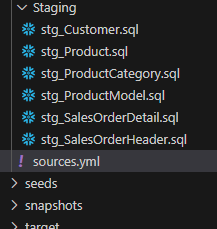
In the Visual Studio Code project you can have sources in every YAML file. In this case I decided to use a separate yaml file and I added this to the project. I named it sources.yaml.
The sources.yaml file has the following content (this yaml file is with errors, I have included a correct one below) :
sources:
-name: AdventureWorksLT
schema : SalesLT
tables:
- name: CUSTOMER
identifier: STG_CUUSTOMER
- name: PRODUCT
identifier: STG_PRODUCT
- name: PRODUCTCATEGORY
identifier: STG_PRODUCTCATEGORY
- name: PRODUCTMODEL
identifier: STG_PRODUCTMODEL
- name: SALESORDERHEADER
identifier: STG_SALESORDERHEADER
- name: SALESORDERDETAIL
identifier: STG_SALESORDERDETAILNow the next step is to change the source queries in the staging file scripts with the source function. The defintion of this function according to DBT Docs : "Returns a relation for a source. Creates dependencies between a source and the current model, which is useful for documentation and model selection. Compiles to the full object name in the database."
Lets try this.
This is the source reference expression to use
{{source('ADVENTUREWORKSLT', 'CUSTOMER')}}But YAML files can be a real pain to maintain. If something is wrong with the tabs or casing, it will give an error. With DBT COMPILE you can verify that your DBT project is shaped correctly (or not). Here is an example of error message of an erroneous YAML.
sources:
- name: ADVENTUREWORKSLT
schema: SALESLT
tables:
- name: CUSTOMER
identifier: CUSTOMER
- name: PRODUCT
identifier: PRODUCT
- name: PRODUCTCATEGORY
identifier: PRODUCTCATEGORY
- name: PRODUCTMODEL
identifier: PRODUCTMODEL
- name: SALESORDERHEADER
identifier: SALESORDERHEADER
- name: SALESORDERDETAIL
identifier: SALESORDERDETAILWhen you reached Nirvana, everything is correct, then the following message as in this screenshot appears :
Final Thoughts
I'm not yet really convinced about the purpose of this function, but that may be my lack of understanding of DBT. Abstraction can help to deploy the model to multiple database for instance in different environments (not sure how this would work with sources). Or you can use this for documentation. Anyway much to learn from DBT.
Hennie
zondag 17 december 2023
Build staging, dimensions and facts in DBT for Snowflake (PART II)
Introduction
In this blogpost, I've written a description about the models I've created sofar based on the AdventureWorks LT database in Snowflake. In the previous blogpost I described the setup of the project and I created a Customer model. In this blogpost I'll create the other views (models) on the AdventureWorksLT Database.
This blogpost is a blogpost in a serie of blogposts :
- Build a data warehouse with DBT and Snowflake on AdventureWorksLT (PART I)
- Build Staging and Dimensions in DBT for Snowflake (PART II)
- Sources in DBT for Snowflake (PART III)
- Data freshness for DBT in snowflake (Part IV)
- Snapshots in DBT for Snowflake (Part V)
- Generic tests in DBT for Snowflake (PART VI)
- Singular tests in DBT for Snowflake (Part VII)
- Add packages to your DBT project (Part VIII)
- Adding documentation to your DBT project (Part IX)
- Working with hooks in DBT (Part X)
- Ephemeral tables in DBT (Part XI)
Creating the staging models
I've already created the Staging Customer model in the previous blogpost.
stg_Customer
WITH CTE_STG_CUSTOMER AS (
SELECT *
FROM ADVENTUREWORKSLT.SALESLT.CUSTOMER
)
SELECT
SUFFIX
,MIDDLENAME
,EMAILADDRESS
,COMPANYNAME
,NAMESTYLE
,PASSWORDHASH
,CUSTOMERID
,PHONE
,SALESPERSON
,TITLE
,FIRSTNAME
,LASTNAME
,MODIFIEDDATE
,ROWGUID
,PASSWORDSALT
FROM CTE_STG_CUSTOMER;stg_Product
WITH CTE_STG_PRODUCT AS (
SELECT *
FROM ADVENTUREWORKSLT.SALESLT.PRODUCT
)
SELECT
WEIGHT
,ROWGUID
,COLOR
,SELLSTARTDATE
,PRODUCTMODELID
,MODIFIEDDATE
,SELLENDDATE
,SIZE
,STANDARDCOST
,PRODUCTID
,LISTPRICE
,THUMBNAILPHOTOFILENAME
,THUMBNAILPHOTO
,NAME
,PRODUCTNUMBER
,DISCONTINUEDDATE
,PRODUCTCATEGORYID
FROM CTE_STG_PRODUCTstg_ProductCategory
WITH CTE_STG_PRODUCTCATEGORY AS (
SELECT *
FROM ADVENTUREWORKSLT.SALESLT.PRODUCTCATEGORY
)
SELECT
PARENTPRODUCTCATEGORYID
,MODIFIEDDATE
,PRODUCTCATEGORYID
,ROWGUID
,NAME
FROM CTE_STG_PRODUCTCATEGORYstg_ProductModel
WITH CTE_STG_PRODUCTMODEL AS (
SELECT *
FROM ADVENTUREWORKSLT.SALESLT.PRODUCTMODEL
)
SELECT
ROWGUID
,CATALOGDESCRIPTION
,PRODUCTMODELID
,NAME
,MODIFIEDDATE
FROM CTE_STG_PRODUCTMODELstg_SalesOrderDetail
This view is the base for the fact Sales.
WITH CTE_STG_SALESORDERDETAIL AS (
SELECT *
FROM ADVENTUREWORKSLT.SALESLT.SALESORDERDETAIL
)
SELECT
PRODUCTID
,ORDERQTY
,ROWGUID
,MODIFIEDDATE
,LINETOTAL
,UNITPRICEDISCOUNT
,UNITPRICE
,SALESORDERDETAILID
,SALESORDERID
FROM CTE_STG_SALESORDERDETAILstg_SalesOrderHeader
This view is the base for the fact Sales.
WITH CTE_STG_SALESORDERHEADER AS (
SELECT *
FROM ADVENTUREWORKSLT.SALESLT.SALESORDERHEADER
)
SELECT
FREIGHT
,SALESORDERID
,REVISIONNUMBER
,COMMENT
,ROWGUID
,MODIFIEDDATE
,STATUS
,ORDERDATE
,SHIPTOADDRESSID
,BILLTOADDRESSID
,CREDITCARDAPPROVALCODE
,SHIPDATE
,SUBTOTAL
,TAXAMT
,CUSTOMERID
,PURCHASEORDERNUMBER
,TOTALDUE
,ACCOUNTNUMBER
,DUEDATE
,SHIPMETHOD
,ONLINEORDERFLAG
FROM CTE_STG_SALESORDERHEADERDBT RUN
Okay, We setup the project in Visual Studio Code and now the next step is to run the model to make sure that the objects are created in the Data warehouse.
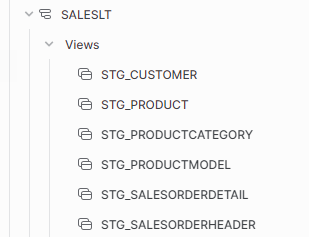
And when dbt run is run the following views are created in Snowflake :
Dimensions
Th next step is to create the data warehouse in Snowflake with DBT:
Dim_Calendar
I've copied the code from my earlier blogpost about creating a date dimension with the GENERATOR function. Now, I had to comment the first line because DBT returns an error when I execute the script. I haven't searched for an solution, yet.
--ALTER SESSION SET WEEK_START = 7
WITH CTE_MY_DATE AS (
SELECT DATEADD(DAY, SEQ4(), '2000-01-01') AS MY_DATE
FROM TABLE (GENERATOR(ROWCOUNT => 365 * 40 + 10))
)
SELECT
TO_NUMBER(TO_CHAR(MY_DATE,'yyyymmdd')) AS CalendarID
,TO_DATE(MY_DATE) AS CalendarShortDate
,TO_DATE(MY_DATE) - 1 AS CalendarPreviousDate
,TO_DATE(MY_DATE) + 1 AS CalendarNextDate
,TO_VARCHAR(MY_DATE, 'DD/MM/YYYY') AS CalendarShortDateStyle103
,TO_VARCHAR(MY_DATE, 'DD-MM-YYYY') AS CalendarShortDateStyle105
,TO_VARCHAR(MY_DATE, 'MM-DD-YYYY') AS CalendarShortDateStyle110
,TO_VARCHAR(MY_DATE, 'MM/DD/YYYY') AS CalendarShortDateStyle101
,CASE WHEN DATE_PART(day, MY_DATE) / 10 = 1 THEN 'th' ELSE
CASE RIGHT(DATE_PART(day, MY_DATE), 1)
WHEN '1' THEN 'st'
WHEN '2' THEN 'nd'
WHEN '3' THEN 'rd'
ELSE 'th' END
END AS CalendarDaySuffix
,DATE_PART(dayofweek, MY_DATE) AS CalendarDayOfWeek
,DATE_PART(dayofweekiso, MY_DATE) AS CalendarDayOfWeekISO
,DATE_PART(day, MY_DATE) AS CalendarDayOfMonth
,DATE_PART(dayofyear, MY_DATE) AS CalendarDayOfYear
,DAYNAME(MY_DATE) AS CalendarShortDayName
,DECODE(DAYNAME(MY_DATE),
'Mon','Monday',
'Tue','Tuesday',
'Wed', 'Wednesday',
'Thu','Thursday',
'Fri', 'Friday',
'Sat','Saturday',
'Sun', 'Sunday'
) AS CalendarLongDayName
, CASE WHEN DATE_PART(dayofweekiso, MY_DATE) NOT IN (6,7) THEN 1 ELSE 0 END AS CalendarIsWeekDay
, CASE WHEN DATE_PART(dayofweekiso, MY_DATE) IN (6,7) THEN 1 ELSE 0 END AS CalendarIsWeekendDay
, DATEADD(day, -1 * (DATE_PART(DAYOFWEEK, MY_DATE) -1), MY_DATE) AS WeekStartDate --Sunday
, DATEADD(day, -1 * (DATE_PART(DAYOFWEEKISO, MY_DATE) -1), MY_DATE) AS WeekStartISODate --Monday
, DATEADD(day, 6 - (DATE_PART(DAYOFWEEK, MY_DATE)-1), MY_DATE) AS WeekEndDate --Sunday
, DATEADD(day, 6 - (DATE_PART(DAYOFWEEKISO, MY_DATE) -1), MY_DATE) AS WeekEndISODate --Monday
, TO_DATE(DATEADD(day, - (DATE_PART(day, MY_DATE) - 1), MY_DATE)) AS CalendarFirstDayOfMonth
, LAST_DAY(MY_DATE, 'month') AS CalendarLastDayOfMonth
, TO_DATE(DATEADD(quarter, DATEDIFF(quarter, '2000-01-01'::TIMESTAMP, MY_DATE), '2000-01-01'::TIMESTAMP)) AS CalendarFirstDayOfQuarter
, LAST_DAY(MY_DATE, 'quarter') AS CalendarLastDayOfQuarter
, TO_DATE('01/01/' || TO_VARCHAR(DATE_PART(year, MY_DATE))) AS CalendarFirstDayOfYear
, LAST_DAY(MY_DATE, 'year') AS CalendarLastDayOfYear
-- Week
, DATE_PART(week, MY_DATE) AS CalendarWeekOfYear
, RIGHT('0' || DATE_PART(week, MY_DATE), 2) || YEAR(DATEADD(day, 26 - DATE_PART(week, MY_DATE), MY_DATE)) AS CalendarWWYYYY
, YEAR(DATEADD(day, 26 - DATE_PART(week, MY_DATE), MY_DATE)) || RIGHT('0' || DATE_PART(week, MY_DATE), 2) AS CalendarYYYYWW
, CASE WHEN DATE_PART(week, CalendarLastDayOfYear) = 53 THEN 1 ELSE 0 END AS Has53Weeks
-- WeekISO
, DATE_PART(weekiso, MY_DATE) AS CalendarISOWeekOfYear
, RIGHT('0' || DATE_PART(weekiso, MY_DATE), 2) || YEAR(DATEADD(day, 26 - DATE_PART(weekiso, MY_DATE), MY_DATE)) AS CalendarISOWWYYYY
, YEAR(DATEADD(day, 26 - DATE_PART(weekiso, MY_DATE), MY_DATE)) || RIGHT('0' || DATE_PART(weekiso, MY_DATE), 2) AS CalendarISOYYYYWW
, CASE WHEN DATE_PART(weekiso, CalendarLastDayOfYear) = 53 THEN 1 ELSE 0 END AS Has53ISOWeeks
-- Month
, DATE_PART(month, MY_DATE) AS CalendarMonthNumber
, CASE WHEN CalendarISOWeekOfYear >= 1 AND CalendarISOWeekOfYear <= 4 Then 1 --4
WHEN CalendarISOWeekOfYear >= 5 AND CalendarISOWeekOfYear <= 8 Then 2 --4
WHEN CalendarISOWeekOfYear >= 9 AND CalendarISOWeekOfYear <= 13 Then 3 --5
WHEN CalendarISOWeekOfYear >= 14 AND CalendarISOWeekOfYear <= 17 Then 4 --4
WHEN CalendarISOWeekOfYear >= 18 AND CalendarISOWeekOfYear <= 21 Then 5 --4
WHEN CalendarISOWeekOfYear >= 22 AND CalendarISOWeekOfYear <= 27 Then 6 --5
WHEN CalendarISOWeekOfYear >= 28 AND CalendarISOWeekOfYear <= 31 Then 7 --4
WHEN CalendarISOWeekOfYear >= 32 AND CalendarISOWeekOfYear <= 35 Then 8 --4
WHEN CalendarISOWeekOfYear >= 36 AND CalendarISOWeekOfYear <= 40 Then 9 --5
WHEN CalendarISOWeekOfYear >= 41 AND CalendarISOWeekOfYear <= 44 Then 10 --4
WHEN CalendarISOWeekOfYear >= 45 AND CalendarISOWeekOfYear <= 48 Then 11 --4
WHEN CalendarISOWeekOfYear >= 49 AND CalendarISOWeekOfYear <= 53 Then 12 --5
END AS CalendarISOMonthNumber
, TO_VARCHAR(DATE_PART(year, MY_DATE)) || RIGHT('0' || TO_VARCHAR(DATE_PART(month, MY_DATE)),2) AS CalendarYYYYMM
, RIGHT('0' || TO_VARCHAR(DATE_PART(month, MY_DATE)),2) || TO_VARCHAR(DATE_PART(year, MY_DATE)) AS CalendarMMYYYY
, CASE WHEN DATE_PART(weekiso, LAST_DAY(MY_DATE, 'year')) = 53 THEN 1 ELSE 0 END AS CalendarHas53ISOWeeks
-- Quarter
, DATE_PART(quarter, MY_DATE) AS CalendarQuarter
, CASE WHEN CalendarISOWeekOfYear >= 1 AND CalendarISOWeekOfYear <= 13 Then 1
WHEN CalendarISOWeekOfYear >= 14 AND CalendarISOWeekOfYear <= 27 Then 2
WHEN CalendarISOWeekOfYear >= 28 AND CalendarISOWeekOfYear <= 40 Then 3
WHEN CalendarISOWeekOfYear >= 41 AND CalendarISOWeekOfYear <= 53 Then 4
END AS CalendarISOQuarter
-- Year
, DATE_PART(year, MY_DATE) AS CalendarYear
, 'CY ' || TO_VARCHAR(CalendarYear) AS CalendarYearName
-- , YEAR(DATEADD(day, 26 - DATE_PART(weekiso, MY_DATE), MY_DATE)) AS CalendarISOYear
,DATE_PART(yearofweekiso, MY_DATE) AS CalendarISOYear
, CASE WHEN (CalendarYear % 400 = 0) OR (CalendarYear % 4 = 0 AND CalendarYear % 100 <> 0)
THEN 1
ELSE 0
END AS CalendarIsLeapYear
FROM CTE_MY_DATEDim_Customer
One of the cool things about DBT is the ref function. With the ref function you can reference models in your project.
WITH CTE_DIM_CUSTOMER AS (
SELECT *
FROM {{ref('stg_Customer')}}
)
SELECT
SUFFIX
,MIDDLENAME
,EMAILADDRESS
,COMPANYNAME
,NAMESTYLE
,PASSWORDHASH
,CUSTOMERID
,PHONE
,SALESPERSON
,TITLE
,FIRSTNAME
,LASTNAME
,MODIFIEDDATE
,ROWGUID
,PASSWORDSALT
FROM CTE_DIM_CUSTOMERDim_Product
The product dimension :
WITH CTE_STG_PRODUCT AS (
SELECT *
FROM {{ref('stg_Product')}}
),
CTE_STG_PRODUCTCATEGORY AS (
SELECT *
FROM {{ref('stg_ProductCategory')}}
),
CTE_STG_PRODUCTMODEL AS (
SELECT *
FROM {{ref('stg_ProductModel')}}
)
SELECT
P.PRODUCTID
,P.PRODUCTNUMBER
,P.NAME AS PRODUCTNAME
,P.SELLSTARTDATE
,P.SELLENDDATE
,P.DISCONTINUEDDATE
,P.COLOR
,P.SIZE
,P.WEIGHT
,P.STANDARDCOST
,P.LISTPRICE
,PC.NAME AS PRODUCTCATEGORY
,PM.NAME AS PRODUCTMODEL
FROM CTE_STG_PRODUCT P
INNER JOIN CTE_STG_PRODUCTCATEGORY PC ON P.PRODUCTCATEGORYID = PC.PRODUCTCATEGORYID
INNER JOIN CTE_STG_PRODUCTMODEL PM ON P.PRODUCTMODELID = PM.PRODUCTMODELIDFact_Sales
And the Fact Sales Fact..
WITH CTE_stg_SalesOrderHeader AS (
SELECT *
FROM SALESLT.stg_SalesOrderHeader
),
CTE_stg_SalesOrderDetail AS (
SELECT *
FROM SALESLT.stg_SalesOrderdetail
)
SELECT
SOH.CUSTOMERID --FK dimension
,SOD.PRODUCTID --FK dimension
,SOH.SALESORDERID --DD
,SOH.PURCHASEORDERNUMBER
,SOH.ACCOUNTNUMBER
,SOH.REVISIONNUMBER
,SOH.COMMENT
,SOH.SHIPMETHOD
,SOH.ONLINEORDERFLAG
,TO_NUMBER(TO_CHAR(SOH.ORDERDATE,'yyyymmdd')) AS ORDERDATEID --FK Calendar dimension
,SOH.MODIFIEDDATE
,TO_NUMBER(TO_CHAR(SOH.SHIPDATE,'yyyymmdd')) AS SHIPDATEID
,TO_NUMBER(TO_CHAR(SOH.DUEDATE,'yyyymmdd')) AS DUEDATEID
,SOH.STATUS
,SOH.CREDITCARDAPPROVALCODE
,SOH.FREIGHT
,SOD.LINETOTAL
,SOD.UNITPRICEDISCOUNT
,SOD.UNITPRICE
,SOD.SALESORDERDETAILID
FROM CTE_stg_SalesOrderHeader SOH
INNER JOIN CTE_stg_SalesOrderDetail SOD ON SOH.SALESORDERID = SOD.SALESORDERID
And now lets check if all the objects are created in Snowflake
Materialize dim and fact as a table
But, do we want for every object and view? May be it's logical to use a view for lightweight transformations, but for the query intensive objects like dimensions and facts it might logical to use tables. In DBT we can change that in the dbt_project.yml file. Use thename of the folder to distinguish the staging views from the dimension and fact tables.
Let's run dbt run and check the presence of views and tables in Snowflake :
Yes that worked pretty well.
Final Thoughts
In this blogpost I've created a small data warehouse with DBT. I'll continue with blogging about DBT in the next blogposts.
Hennie